Consent and the DPDP Act
A dated consent record per contact and channel: opt-outs are always honoured, and a recorded yes can be required.
Updated 13 Nov 2026
India's Digital Personal Data Protection Act (the DPDP Act) expects a business to respect a person's choice about being contacted, and to be able to show its record. KretaOS keeps that record for you, contact by contact and channel by channel, and checks it before anything is sent.
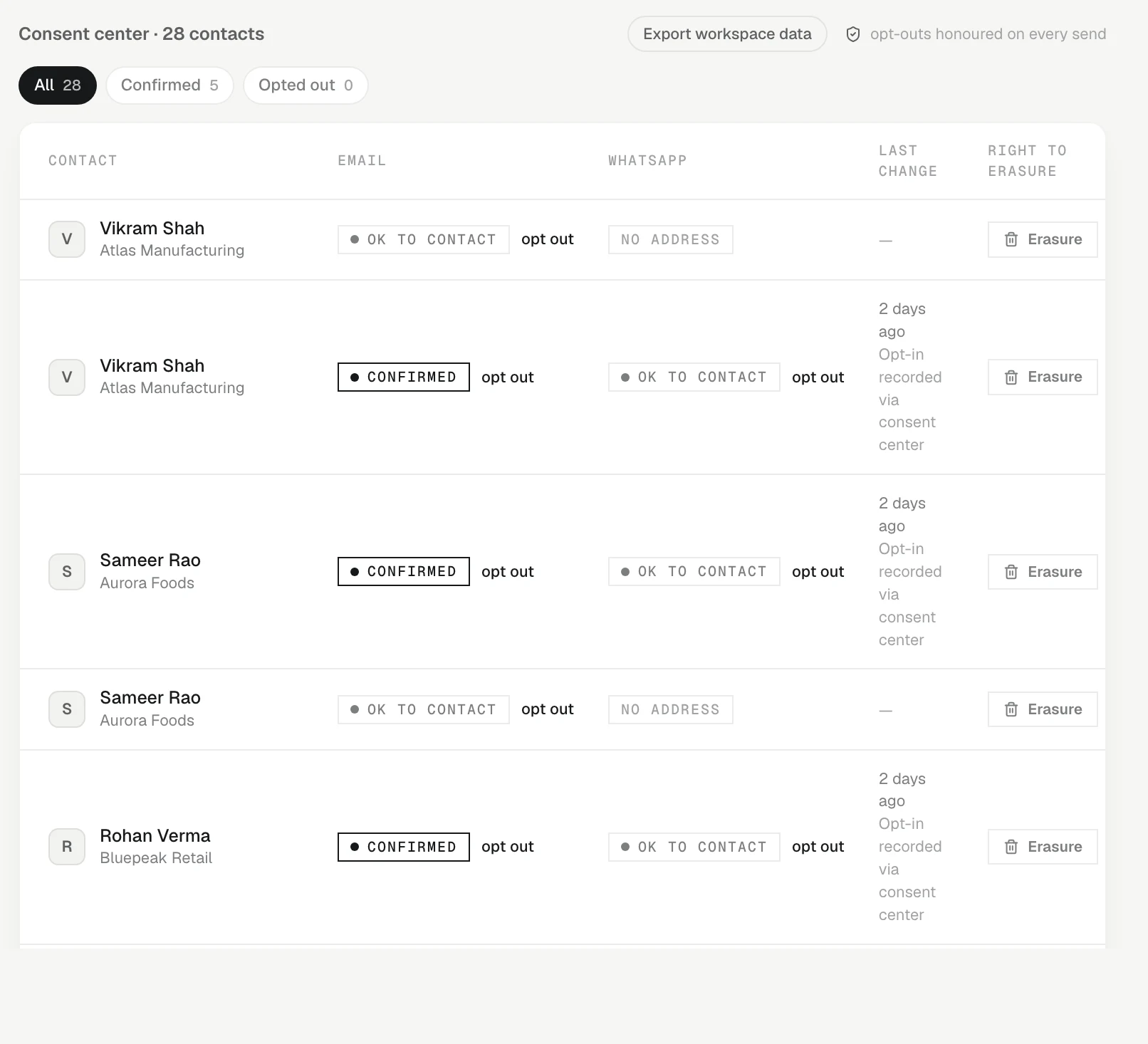
How consent works
Each contact has a status for Email and for WhatsApp, kept separately:
- OK to contact — their address is on file and they have not opted out. You can message them.
- Confirmed — their yes is recorded.
- Opted out — they asked you to stop. KretaOS never sends there.
KretaOS holds a send only when the person has opted out on that channel. It says that nothing was sent and shows what to do. See Why a send was held.
Record an opt-out, or a yes
- On the contact's page. In Consent, press opt out beside the channel. To undo it once they agree again, press allow again.
- In the Consent center. Go to Settings › Compliance and use the same control beside the contact, per channel.
- With Ask AI. "Rajesh asked us to stop WhatsApp." Ask AI always reads the change back and waits for your yes before recording it.
- By the client, on WhatsApp. A reply that is just STOP or Unsubscribe is recorded as an opt-out straight away.
When a client writes to your WhatsApp Business number first, KretaOS records their WhatsApp consent as confirmed. It never turns an Opted out back on by itself — only a person in your team can do that.
Require a recorded yes
Some teams must hold a recorded yes before any message. An admin can turn on Require recorded consent in Settings › Workspace, under AI autonomy. From then on a message goes only to a contact whose status is Confirmed; others show Not confirmed yet with a record their yes control. Which rule your company needs is your decision — check with your own adviser if you are unsure.
The Consent center
Settings › Compliance lists every contact with their Email and WhatsApp status and the last change. Filter by Confirmed or Opted out to see where you stand.
A record you can show
- Every change is stored with when it happened and where it came from — for example "Opt-in recorded via consent center" or the name of an imported file.
- Consent records are never edited or deleted. An opt-out is a new entry on top of the old one, so the full history stays.
- Consent changes also appear in the audit log.
Data-principal requests
Under the DPDP Act, the people in your book can ask to see, correct or erase their data. In Settings › Workspace › Data & consent, Grievance officer shows the address such requests go to — your workspace admin. For erasure, see Erasure.
Related
- Consent, quiet hours and the daily limit — Three checks run before any email or WhatsApp leaves: that they have not opted out, their local time, and today's count.
- Why a send was held — When KretaOS stops a message, it says which check stopped it, that nothing was sent, and the one step that fixes it.
- Erasure — How a contact's personal data is erased from KretaOS on request — what you do, what the KretaOS team does, and what is kept.
- The audit log — A permanent record of every send, every blocked send and every consent change in your workspace — and who or what did it.
Or write to contact@tamkis.com