People
Add the people you deal with at each client, keep their numbers and consent, and use their page as a person-level history.
Updated 13 Nov 2026
A client is a company; the relationship is with people. KretaOS keeps each person you deal with as their own record, attached to the company they work at, with their numbers, their consent and their own history.
Add a person
- Open the client.
- In the People section, press Add contact.
- Write a sentence in Describe the person and let KretaOS fill the form, or type straight into it: Full name, Role / title, Email, WhatsApp, LinkedIn and Preferred channel.
- Tick Decision maker if they sign off. Drafts and nudges treat them accordingly.
- Press Add contact. KretaOS checks the email and the WhatsApp number first and tells you if one doesn't look right; a phone number needs its country code, for example +91.
If the name, email or number matches someone already in your book, KretaOS asks Is this someone already in your book? Open the existing person, or press No — add … as a new person.
People you mentioned but never added
When a logged touch names someone who is not a contact yet ("spoke to Sunil in accounts"), the timeline offers Add Sunil as a contact under that touch. The bell collects these too, with Add all when there are several. KretaOS only suggests; it never creates a person by itself.
A person's page
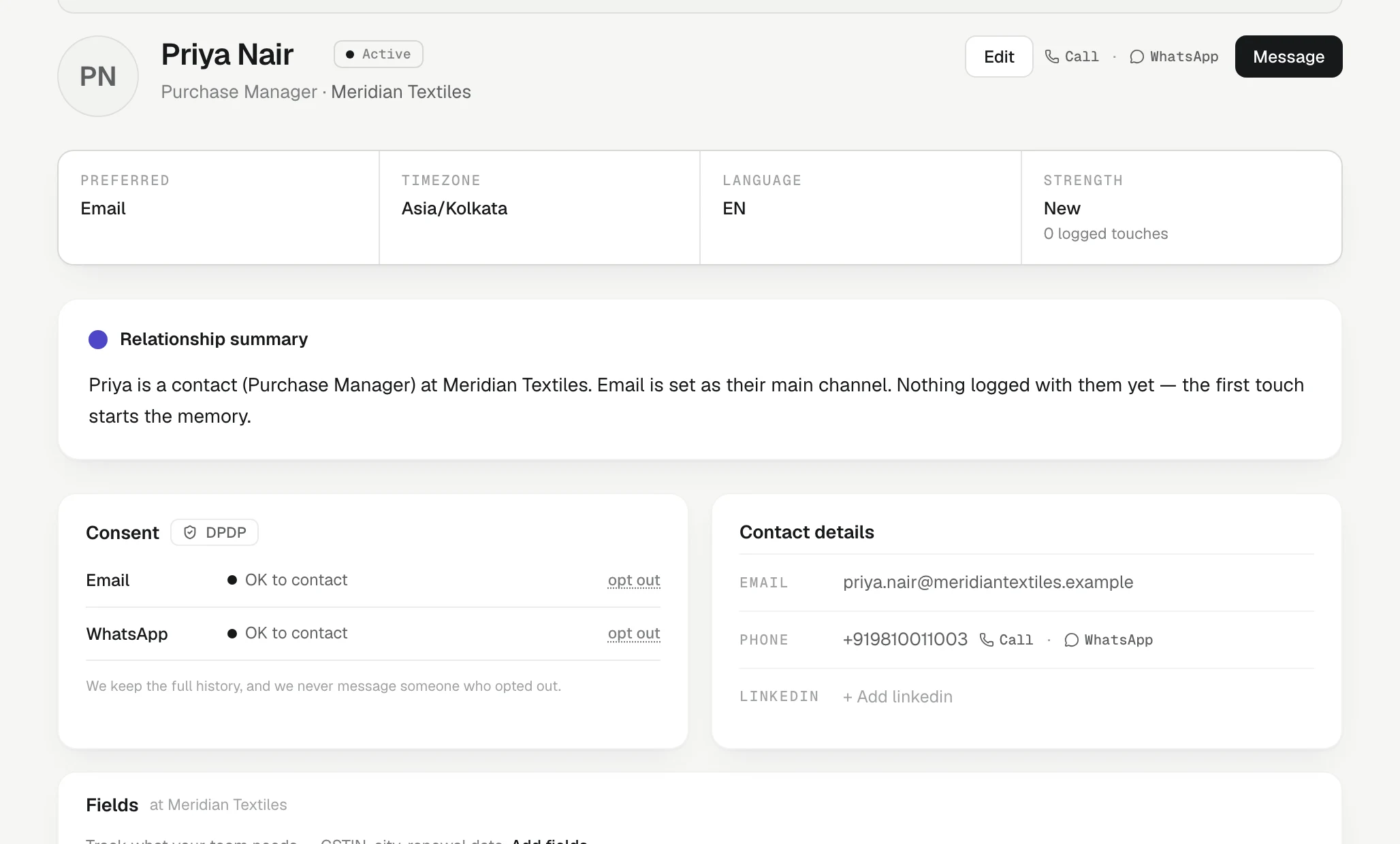
Click a name to open their page:
- Decision maker badge, and a strip with Preferred channel, Timezone, Language and Strength (how many touches are logged with them).
- A short Relationship summary.
- Consent, per channel, and Contact details.
- Fields, if your workspace has added any for people.
- Companies, past and present, when they have more than one.
- Recent activity: every touch with this person.
Press Edit to change their role, numbers, status (Active, Dormant or Left company), preferred channel, language, timezone and Decision maker. A new email or number shows on the page straight away, and it is the one every later message goes to. A change of email or WhatsApp is recorded in the audit trail with the old and new value.
Calling and messaging
Every phone number shows a Call link and a WhatsApp link, so on a phone you can call or chat in one tap. A bare 10-digit Indian number is dialled with +91. After you tap, KretaOS offers Log this call or Log this chat, which opens the client's Log activity card ready for you. Tapping is never logged by itself; you say what happened.
Making someone reachable
Once a person has an email address or a WhatsApp number, you can message them there. If they have neither you see Make reachable: add the number or email and press Save. KretaOS never sends to someone who has opted out; that is recorded in Consent on their page. See Consent, quiet hours and the daily limit.
Related
- Same person, two companies — Link one person across the companies they work with instead of merging, so their history and trust travel with them.
- Clients, leads and partners — The four kinds of record on the Clients page, the statuses each one moves through, and how a lead becomes a client.
- Consent and the DPDP Act — A dated consent record per contact and channel: opt-outs are always honoured, and a recorded yes can be required.
- Network — Warm paths into leads, people who connect your accounts, who moved on, and accounts that rest on one person.
Or write to contact@tamkis.com