Comments and mentions
Talk about a client with your team right on its page, @mention a teammate to ring their bell, and keep it all internal.
Updated 8 Oct 2026
Most teams discuss clients in a WhatsApp group, where the conversation scrolls away and never reaches the client's record. Team comments put that talk on the client's page, where the next person to open it will see it.
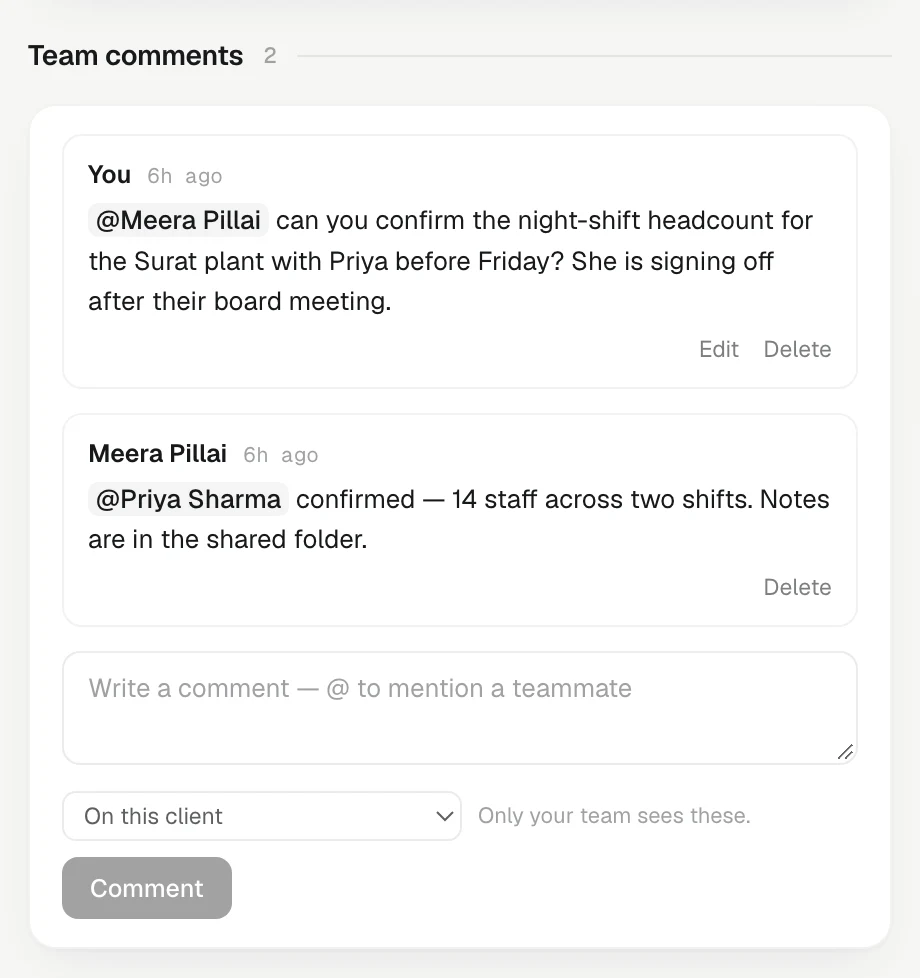
Write a comment
- Open the client, open its About tab and find Team comments.
- Write in the box: "Rajesh is unhappy with the last dispatch, let's not push the new range this week."
- To make it about one deal, pick it in the menu beside the box (On this client or On deal: …).
- Press Comment.
Mention a teammate
Type @ and start a teammate's name, then pick them from the list. When you post, their bell rings with a Mention alert that links straight to the comment's client, and their phone too if they have notifications switched on.
Only live teammates can be mentioned, and you never notify yourself. Editing a comment to add a name rings only the newly added person; it does not ring the others again.
Edit or delete
- Edit your own comment to fix it. It then shows edited beside the time, and the earlier wording is kept on record.
- Delete your own comment. It asks Delete this comment?; press Delete to confirm or Keep to cancel.
- An Admin can delete anyone's comment.
Comments stay inside the team
- Never shown to the client. Comments are not sent, shared or attached to anything that leaves KretaOS.
- Never read by the AI. Ask AI does not see them, drafts do not use them, and they never become facts in the client's memory. Say what you like about a difficult buyer.
- Seen by the whole team. Anyone in the workspace who can open the client can read its comments. For something only you should see, keep it out of comments.
The box itself reminds you: Only your team sees these.
Good to know
- Comments are not touches. They do not move Last contact or the relationship score; log the call itself with Log.
- If two client records are merged, their comments move to the record that is kept.
- Viewers can read comments but cannot write them.
Related
- What becomes memory — Which touches KretaOS reads for facts and promises, what it deliberately throws away, and what it never reads at all.
- Notifications and push — What the bell tells you, how to mute the alerts you don't need, and how to get them on your phone or computer.
- Client collaborators — Set a client's owner and add the teammates who also work it, so it shows up in their list and their digest.
- People — Add the people you deal with at each client, keep their numbers and consent, and use their page as a person-level history.
Or write to contact@tamkis.com