Promises
Work through what you owe and what you are owed: add a promise, put a date on it, turn it into a reminder, mark it kept or drop it.
Updated 13 Nov 2026
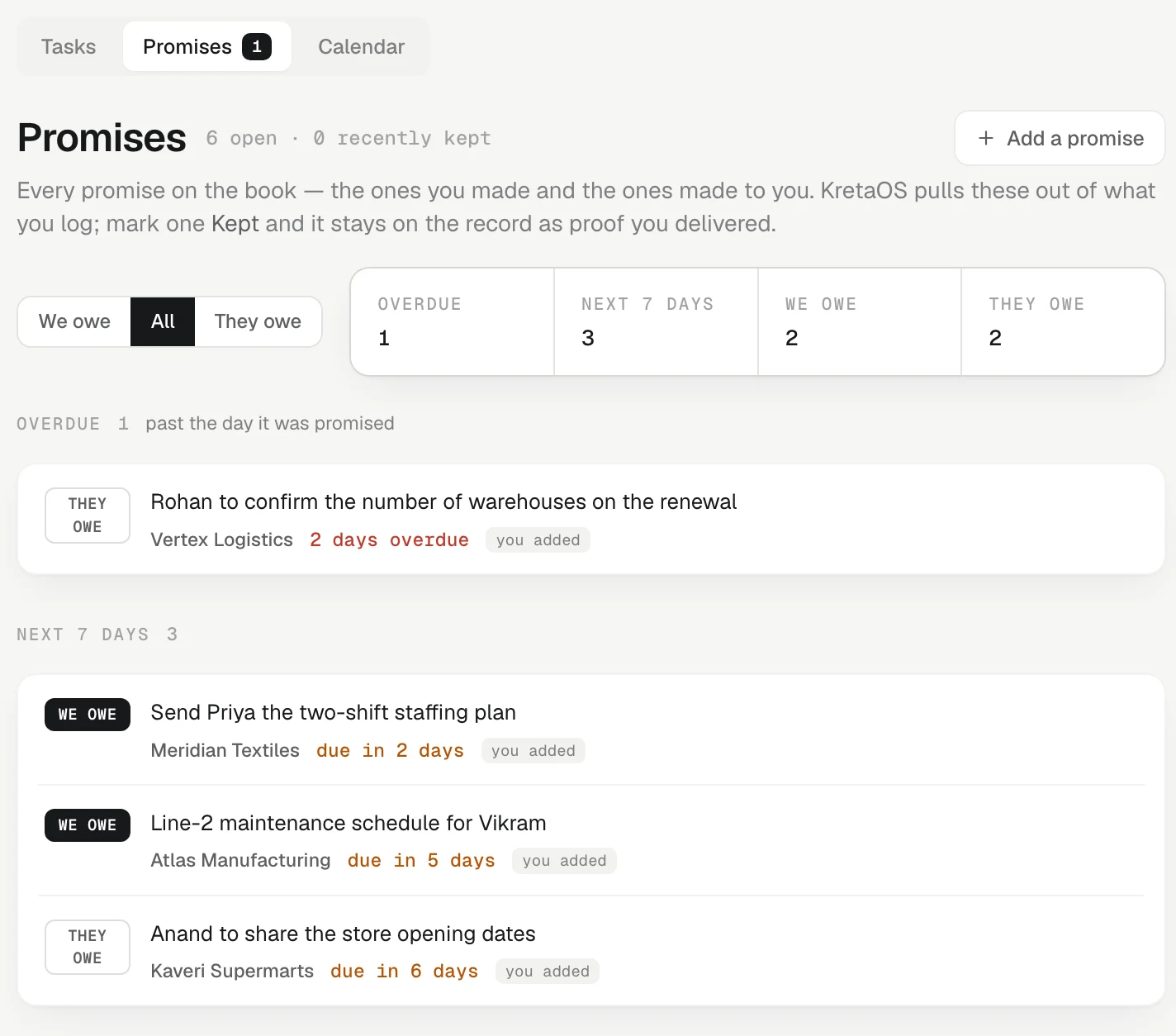
The Promises view in Agenda is the promise ledger as a working list: every promise on your book, the ones you made and the ones made to you. On a shared workspace it opens on Mine (promises on the clients you own or are on the team of); an admin can switch to Everyone, a manager to My team, exactly like Tasks. KretaOS fills it from what you log and sync; this article is about working through it. How promises are found is explained in The promise ledger.
Open it
In Agenda, switch to Promises under the page title. The count beside it is the number of promises past their date — every one, however old, both those you owe and those you are owed. The page heading reads Promises, with how many are open, how many are overdue and how many were recently kept. Home and Analytics count overdue promises the same way, so the numbers match.
Choose whose promises
The switch at the top has five settings:
- We owe (the default): what you promised, and the promises nobody has said who owes. These cost the relationship when they slip. When nothing is open on your side and the client's side has open promises, the page opens on They owe instead, so you never land on an empty list.
- All: everything, including the recently kept ones.
- They owe: what clients promised you, such as a PO, a sample approval or a payment.
- Kept: the promises recently marked kept.
- Dropped: the promises dropped, each with the day and the reason, such as "dropped on 4 Nov · No longer applies".
A strip counts the whole ledger: Overdue, Next 7 days, We owe and They owe. Overdue counts every promise past its day, however old; how many of them are more than two weeks old is shown under it, such as "2 older than two weeks". We owe and They owe add up to everything open, and each shows how many of its own are overdue.
The groups
- Overdue: past the day it was promised, the most recent slip first. Promises more than two weeks past their date sit in a lighter list inside it, Older than two weeks. Settle the kept ones and put a new day on the rest. It opens by itself when nothing newer is due.
- Next 7 days and Later.
- No date: nobody said when. Put a day on it and it starts counting.
- Recently kept: shown when the switch is on All.
A promise KretaOS is unsure it read correctly is marked unconfirmed; press Yes, that’s right when it is. One you added by hand is marked you added. When nobody said who owes a promise, its row asks Who owes this?: press We do or They do.
Act on a promise
Each row has:
- The calendar button (Put a date on it or Change the date): set or change the day, or clear it. A date in the past is allowed; KretaOS never moves it for you.
- The bell button (Add a follow-up for this to my agenda): adds a follow-up to your Tasks. The row then shows a follow-up chip with its day, for example follow-up today.
- Kept: opens How was it kept? (optional). Type a note if you like, then Mark kept.
- Drop: for a promise that will not be kept and should stop counting. Pick why — No longer applies, Not a promise, Wrong client or Cancelled by the client — then press Drop. Its open reminder is cancelled.
- owed by us / them: shown when it is not yet clear who owes it. Tap one.
A kept promise moves to Recently kept. Reopen it if it was not really kept.
A dropped promise leaves every list and every count, including Home, the morning brief and Analytics, and stays on the record under Dropped. Nothing is deleted. A kept promise cannot be dropped: it is proof you delivered.
Several at once
Tick the box on each promise, or Select all beside a group. A bar appears at the bottom of the screen with Kept all and Drop all. Kept all asks once more before it marks them; Drop all asks for one reason for all of them. Up to 200 at a time. Viewers see no boxes.
Promises and reminders
A reminder is a plan to keep a promise, not the keeping. So:
- Marking a promise Kept also closes its open reminder.
- Closing or cancelling the reminder does not mark the promise kept.
Add one by hand
Press Add a promise, pick Which client?, choose We owe or They owe, write what was promised (revised quote by Friday), optionally pick a Due day, and press Add.
Elsewhere
- Each client's page lists its Open promises, with all → to come here.
- A late promise you owe is ranked into Do now on Home and listed in the morning brief.
- Ask AI: "what do we owe Surat Silk Mills?", "mark the sample promise to Anil as kept" or "drop all of Acme's overdue promises". More than one, or any drop, is shown to you first.
Related
- The promise ledger — How KretaOS finds the promises made on both sides, keeps their dates honest, and keeps a kept promise as proof you delivered.
- Tasks and reminders — Jot a follow-up or reminder in plain words; KretaOS works out the client, the day and the time, and shows you what it filed.
- Snooze and triage — Push one task to a better day, or clear a pile of late follow-ups in a few taps without losing what happened.
- The promise ledger — Every promise on the book in one place — who owes it, by when, and proof you kept it.
Or write to contact@tamkis.com