The promise ledger
Every promise on the book in one place — who owes it, by when, and proof you kept it.
Lesson 2 of 5 5 minUpdated 9 Oct 2026
Relationships rarely break over a big decision. They break over the small thing someone said they would do and didn't — the revised quote, the sample, the callback. KretaOS keeps every one of those in a ledger, so nothing you said in a call slips through.
Where promises come from
A promise is a special kind of fact. When you log "She'll confirm the order by Friday" or "I'll send the revised quote Monday", KretaOS records it with two extra details:
- Who owes it — We owe (your side promised) or They owe (the client promised).
- When — the day it was promised for, if anyone said one.
You can also add one by hand: on the promises page press Add a promise, choose the client under Which client?, write what was promised, pick We owe or They owe, add a day if there is one, and press Add. A promise you add yourself carries a small you added tag.
The ledger
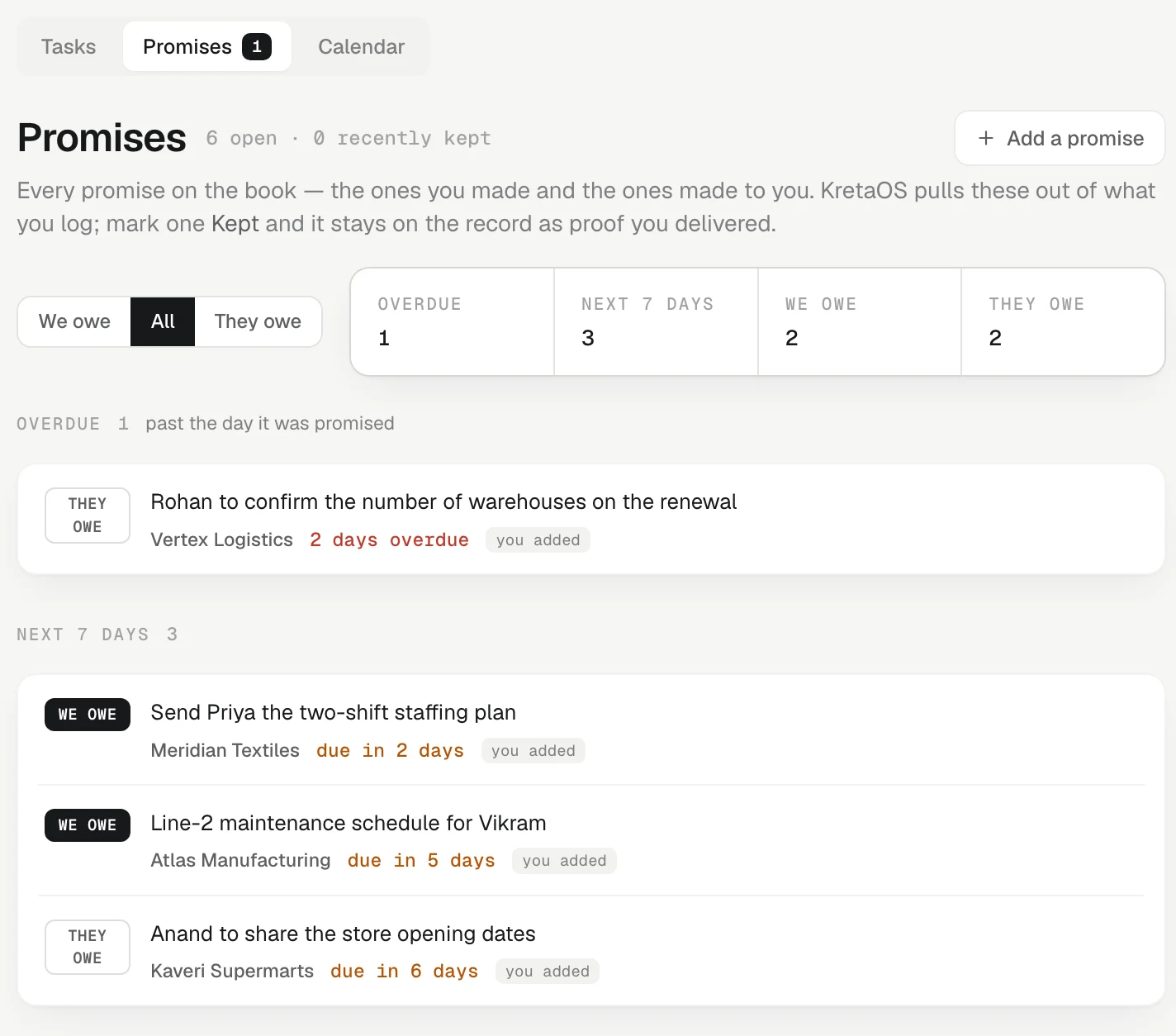
Open Agenda and switch to Promises. The page is called Promises, and it opens on what We owe — the promises that cost you the relationship when they slip (or on They owe when your side has nothing open). All and They owe are one click away.
Promises are grouped by time:
- Overdue — past the day it was promised, however long ago. The ones more than two weeks past their date sit in a lighter list inside it, Older than two weeks, so they don't crowd this week's work. Settle the kept ones and give the rest a new day.
- Next 7 days and Later.
- No date — nobody said when. Put a day on it and it starts counting.
Each client's page also shows its own Open promises above its deals.
Working a promise
Hover a row (on a phone the buttons are always visible):
- The calendar button puts a date on it or changes it. If nobody said who owes it, you can choose us or them here too.
- The bell button (Add a follow-up for this to my agenda) adds a follow-up to your Tasks. The row then shows a follow-up chip with its day.
- Kept settles it. You can add a short note — "How was it kept? (optional)" — then press Mark kept.
A promise marked unconfirmed is one KretaOS was unsure about. It stays on the list on purpose — a promise nobody has looked at is the one that gets dropped — so judge it: mark it kept, date it, or remove the fact on the client's page if it was never said.
Kept is not deleted
Marking a promise Kept does not erase it. A kept promise is still true — it is proof you delivered — so it moves to Recently kept (under All) with the day you kept it and your note. If you marked one by mistake, press Reopen.
Two more rules keep the ledger honest:
- KretaOS never moves a promise's date forward by itself. An overdue promise stays overdue until you deal with it.
- Settling a promise closes its open reminder. Closing or cancelling the reminder does not settle the promise — only you can say it was kept.
Try it
- Open Agenda and switch to Promises.
- Press All and look at what you owe and what clients owe you.
- Pick one promise you have already delivered, press Kept, add a short note, and press Mark kept.
- Find it again under Recently kept.
Related
- What a fact is — How KretaOS turns what you log into short, lasting facts about each client — and what it leaves out on purpose.
Or write to contact@tamkis.com