Company memory
Teach KretaOS who you are and what you sell once, so every draft from every teammate sounds like your company.
Lesson 4 of 5 4 minUpdated 8 Oct 2026
KretaOS knows a great deal about each client. Out of the box, it knows nothing about you. Company memory fixes that, and it is the highest-value half hour an admin can spend in the first week.
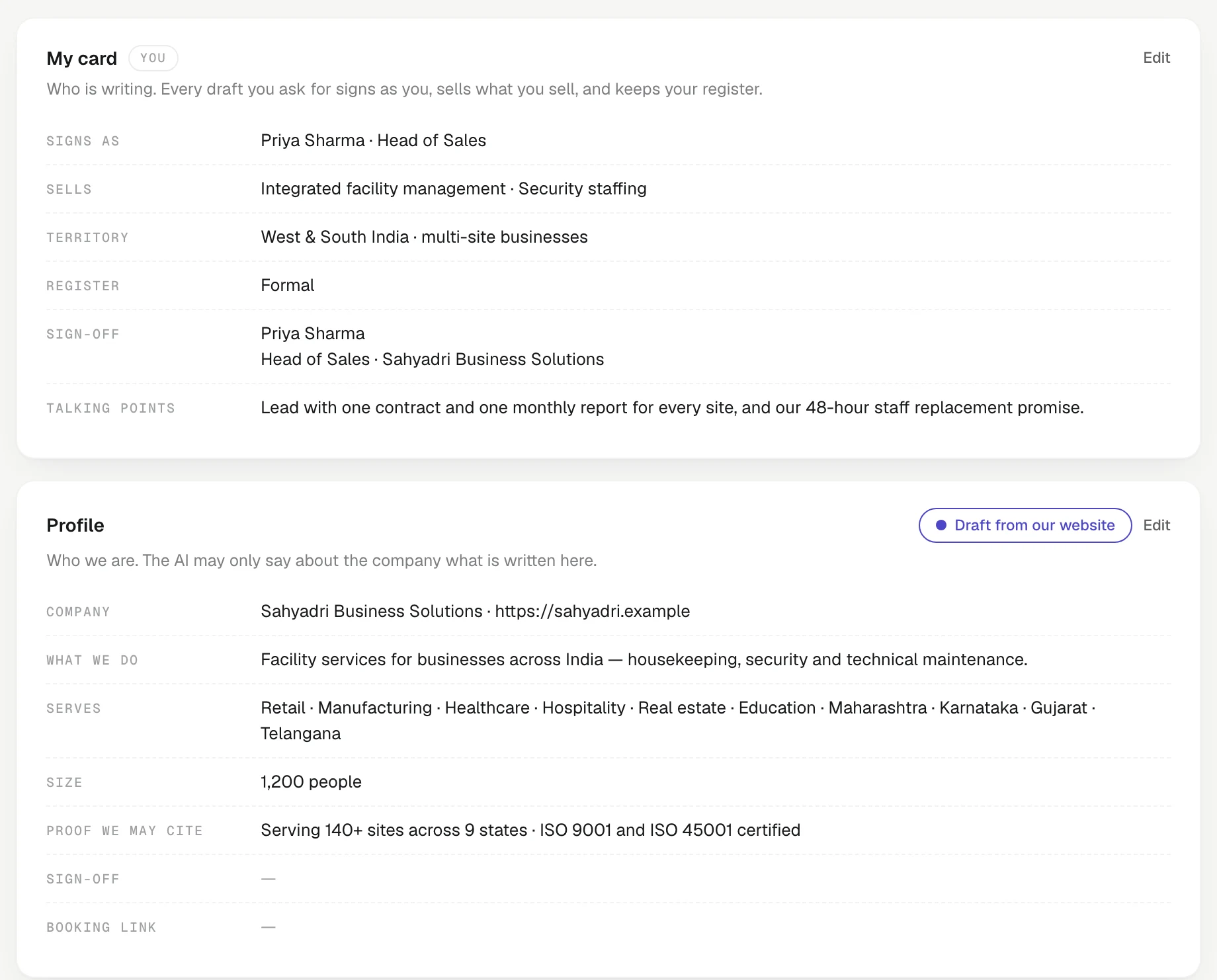
Everything you write on Settings › Company becomes one "About us" that the AI reads before it writes anything: a follow-up draft in the composer, a tone rewrite, an Ask AI answer, a voice call, an automation's AI draft, the suggested next step on a client. Write it once and every teammate's draft carries it.
Start from your website
On the Profile card, press Draft from our website. KretaOS reads your public website and proposes a profile, your offerings and a pitch. Read the proposal, then press Apply to the Company page. Now edit — the website version is a start, not the truth.
Profile: who you are
What we do in one sentence, the Industries and Regions you serve, your Size, a Booking link for meetings and the workspace Sign-off. Be strict with Proof we may cite: the AI will quote these to clients, so only put what you would put in writing — "Serving 40+ textile exporters in Surat since 2016", not "best in class".
Offerings: what you sell
One offering per product or service. The fields that matter most for drafting:
- Who it's for and Problems it solves — so the AI picks the right offering for the right client.
- Objections → answers — one per line, "Too expensive → priced per seat, cheaper than one missed renewal".
- Fits — the industries it suits, so a manufacturing client hears about your manufacturing offer.
Pricing notes stay internal unless you tick The AI may quote this pricing to clients. Leave it unticked if prices are negotiated.
When you stop selling something, set its Status to retired. Never worry about deleting it: it stays on record, drafts stop naming it, and any draft that still mentions it is flagged before it goes out.
Positioning: how you say it
Tagline, Pitch, Value props, Voice ("Plain, warm, specific. No superlatives.") and Never say — words a draft is flagged for using.
Positioning is kept as versions. When the pitch changes, Edit › Save as new version with a note on What changed. The old version stays in History, the team gets a bell, and the page lists the clients who last heard the old pitch — with a shortcut to draft a re-introduction for them.
My card: each teammate
Ask everyone to fill in their own card at the top of the page: title, phone, their own sign-off, the offerings they sell, and private talking points that only they and the AI see. A teammate's card wins over the company layers when the AI writes for them.
Members cannot edit the company layers, but they can press Suggest a change, which rings every admin's bell.
Try it
- Open Settings › Company and press Draft from our website on the Profile card.
- Review the proposal and press Apply to the Company page.
- Open one offering, fill in Objections → answers, and decide whether to tick The AI may quote this pricing to clients.
- Open Ask AI, ask it to draft a follow-up to one of your clients, and check it sounds like your company.
Related
- Company memory — Tell KretaOS who you are, what you sell and how you say it, so every draft the AI writes sounds like your company.
- Library and attachments — Keep your decks, brochures and price lists in one place, attach them to messages, and see when a client opens a link.
Or write to contact@tamkis.com