Library and attachments
Keep your decks, brochures and price lists in one place, attach them to messages, and see when a client opens a link.
Updated 8 Oct 2026
The Library holds what you send to clients: decks, brochures, case studies, price lists. Open it at Settings › Library. It has two views: Files and Templates (messages and snippets you reuse).
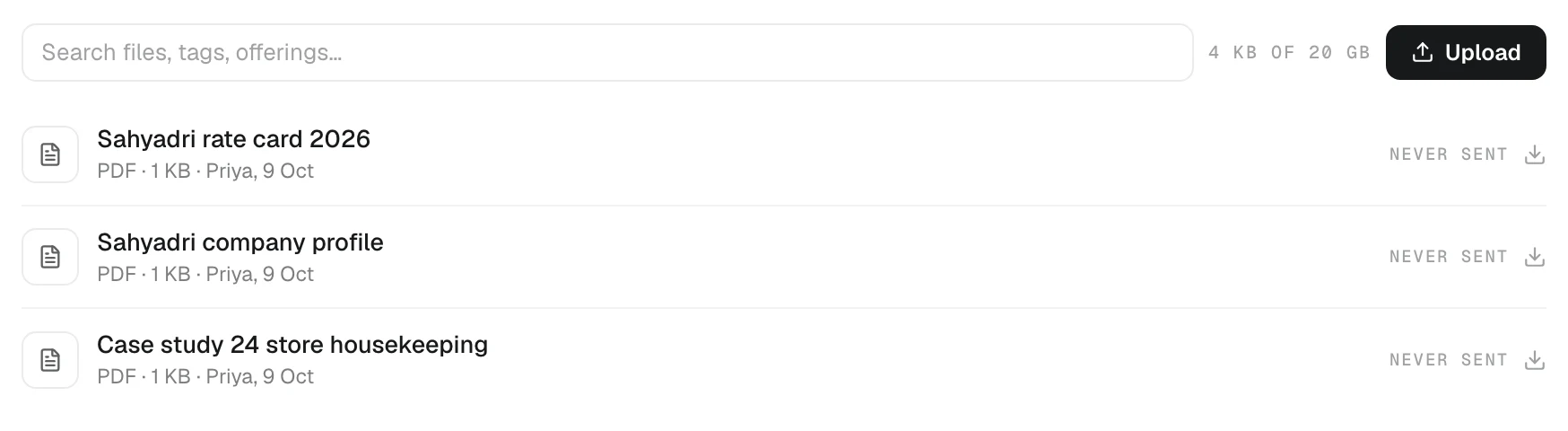
Upload a file
- Open Settings › Library.
- Press Upload, or drop a file on the page.
PDF, Office files, images and text are accepted, up to 25 MB each. Give a file a Title, a Description (one line the AI sees when choosing what to attach), Tags, and the Offering it belongs to. Two options:
- Pinned (always in the AI's list) — for the files you send most.
- Private (only I see and attach it) — everyone else's files are shared with the team.
New versions
When the deck changes, open the file and choose Replace. The new file becomes the next version. Every message you already sent still remembers — and opens — the exact version it carried.
Attach to a message
- In the composer, press the paperclip and pick from the Library, or upload a file there.
- In Ask AI, name the file: "draft a follow-up to Mehta Textiles and attach the pricing deck". The AI finds it by name and shows it on the draft. Remove it if you don't want it.
Tracked links
Some files go as a link instead of an attachment: on WhatsApp, which carries text only, and on email when the files add up to more than 25 MB. KretaOS adds the link to your message and counts opens. The first time a client opens it, you get a bell. The Library shows how many links a file has and how often they were opened.
Retire or delete
- Retire hides a file from new messages. Copies you already sent keep working.
- Delete removes every version for good, and every link a client already has stops working. A file that was sent as a link cannot be deleted — retire it instead. You can delete files you uploaded; an admin can delete any file.
Storage
The top of the page shows storage used by Library files and recorded meeting audio together, against your plan's allowance. Deleting a meeting's audio frees space and keeps its notes and transcript.
Related
- Company memory — Tell KretaOS who you are, what you sell and how you say it, so every draft the AI writes sounds like your company.
Or write to contact@tamkis.com