Finding your way around
The side rail, the top bar's Log and Record, the Ask AI pill, search, the bell, and how the phone layout differs.
Updated 4 Nov 2026
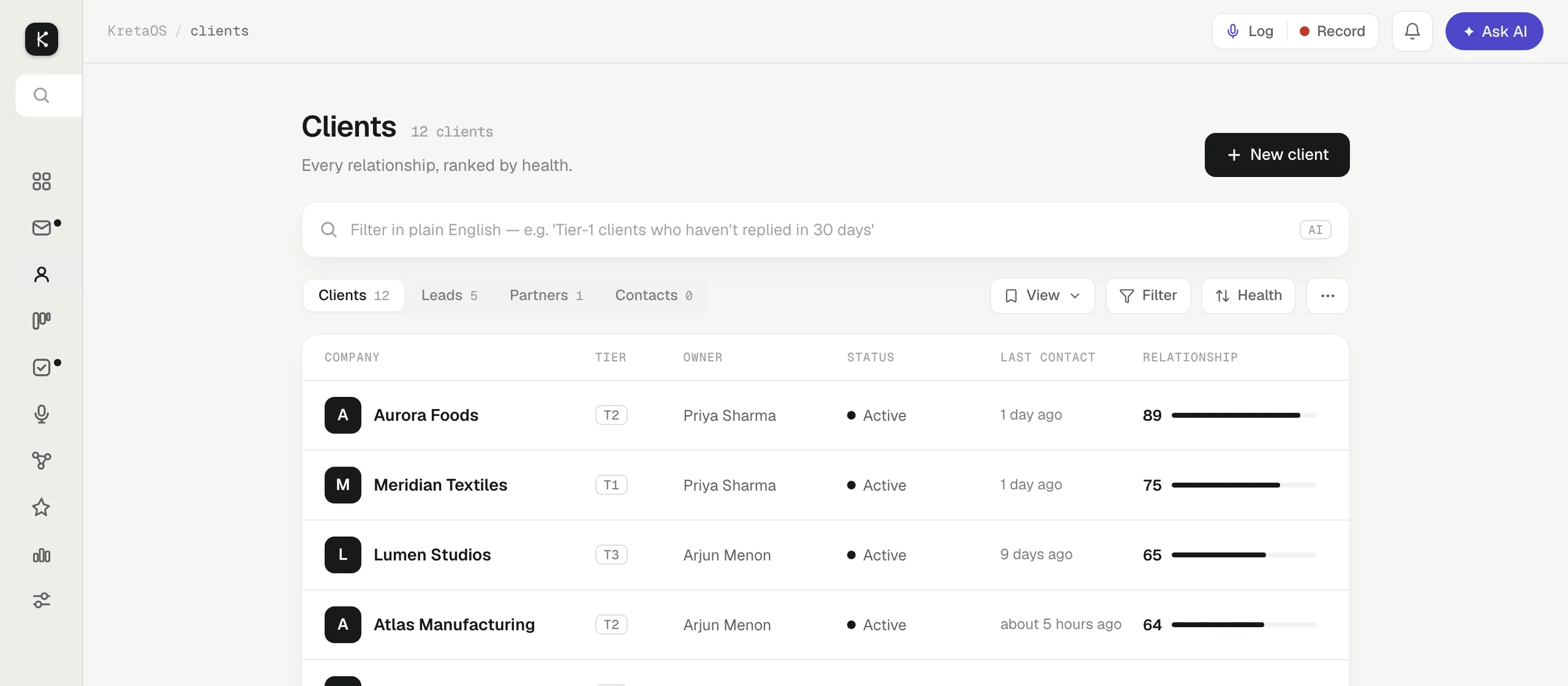
Every screen in KretaOS has the same frame: a rail of pages on the left and a top bar with the things you need from anywhere. On a phone the same pages sit in a tab bar and a menu.
The side rail
On a computer the rail sits on the left. Hover over it to see the names:
- Home: your ranked list for today. See Home and Do now.
- Inbox: client email and messages in one place.
- Clients: every client, lead, partner and contact, ranked by relationship health.
- Deals: your pipeline as a board.
- Agenda: tasks, promises and your calendar, as views along the top (Tasks, Promises and Calendar; a Team view appears when your team list has people). On Tasks, a switch reads Mine, Handed off and Everyone (My team for a manager).
- Recordings: meetings you recorded.
- Network: who connects you to whom (warm paths, alumni, key-person risk), with Graph Memory, your book drawn as a map of clients, people and facts, one link away.
- Ask AI: full-page conversations with Ask AI, with your history.
- Analytics: your numbers and reports.
- Settings: your profile, team, channels, pipeline, fields and more. Automations lives here too.
The search icon at the top of the rail opens search. Your account menu at the bottom has Sign out and Sign out of all devices.
The top bar
- Log | Record: one split button. Log opens the Log sheet to capture a call, note or chat from any page (see Log anything). Record records the meeting you are in.
- The bell: your alerts. See Notifications and push.
- Ask AI: the indigo pill opens the Ask AI panel beside the page you are on.
A Viewer sees a View only chip in place of Log and Record.
Keyboard shortcuts
- ⌘K (Ctrl+K on Windows) opens search. Type a client, deal, person or task (a few letters of each word is enough), or type a question and pick Ask AI. It also does things: type log a call, record, new client, promise, team or help. More in Search your book.
- ⌘L (Ctrl+L) opens the Log sheet.
On a phone
The bottom tab bar has four tabs, Home, Inbox, Clients and Agenda, with the indigo Ask AI button in the middle. The top bar keeps Log | Record, the magnifier for search, and the bell.
Tap your initials at the top right for everything else: a Search clients, people, deals… box, then Deals, Analytics, Recordings, Ask AI, Automations, Network, Settings and Help, and finally Sign out and Sign out of all devices. Promises, Calendar and Team are views inside Agenda, Contacts is a tab on Clients, and reports are built from Analytics.
Related
- Home and Do now — How Home ranks your day into one list, what each row offers, and how to clear a backlog of late follow-ups.
- Log anything — Capture a call, WhatsApp chat, meeting or note from any page in a sentence or by speaking, dated the day it happened.
- Ask AI, first steps — Open Ask AI, ask about your clients in plain words, and let it log, remind and draft for you while you stay in charge.
- Notifications and push — What the bell tells you, how to mute the alerts you don't need, and how to get them on your phone or computer.
Or write to contact@tamkis.com