Home and Do now
How Home ranks your day into one list, what each row offers, and how to clear a backlog of late follow-ups.
Updated 11 Nov 2026
Home answers one question when you open KretaOS: what should I do next? Instead of separate lists for tasks, replies and promises, it ranks everything that needs you into one list.
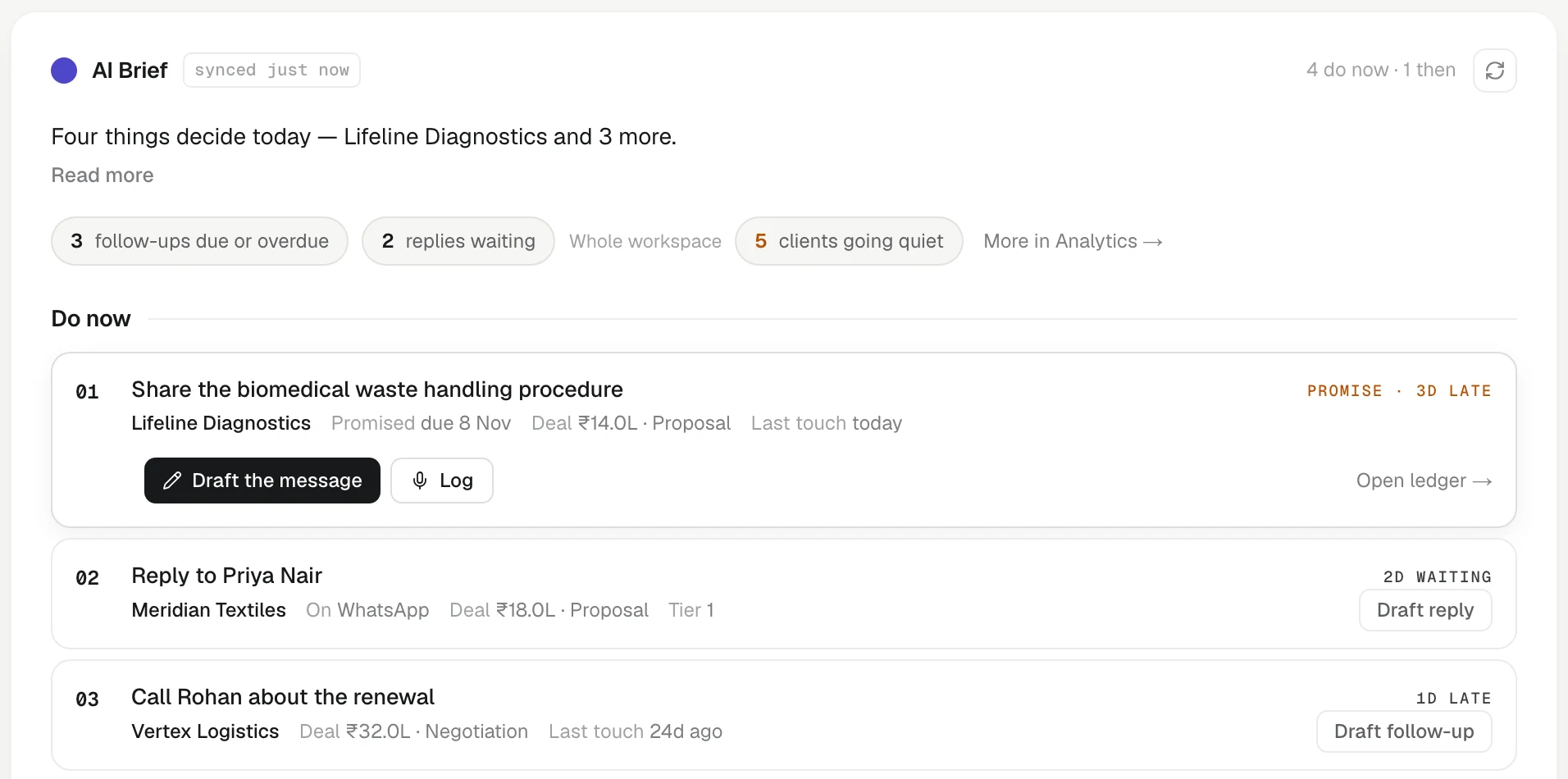
What is on Home
From the top:
- Greeting and progress. Today's date and a bar that reads, for example, TODAY · 3 of 8 done.
- The AI Brief. One sentence about what matters most today and why, written from the same list shown beneath it, so the two never disagree. A row of chips counts the day's signals: follow-ups due today (it reads due or overdue when some have slipped in the last two weeks; older ones are left to the backlog card), replies waiting and clients going quiet. Tap the follow-ups or replies chip to narrow the list to just those rows, every one of them and not only the top few; tap it again, or Show everything, to go back. Press the refresh icon to rewrite the brief.
- Do now. The top of the ranked list.
- Today's meetings. The meetings still ahead on your Google Calendar, in time order, matched to the clients in them. A client meeting that starts within two hours is marked Next, and Brief → opens a one-page brief for it (see Calendar meetings).
- Later today. The next rows of the ranked list, one line each.
- Worth doing. Up to four things KretaOS noticed that have no task yet (see below).
How Do now is ranked
Every candidate gets a score for value (the client's tier and any open deal) and urgency, which favours what is recent: a follow-up due today or one that slipped yesterday, a promise that just passed its date, a reply that came in this morning, a client who has been quiet a while. Anything more than two weeks old — a follow-up, a promise or an unanswered thread — sinks to the bottom. Each client appears once. The top four are Do now; the next four are Later today, and the rest wait in Agenda behind a + N more in Agenda → link.
Each row says why it is there on the right: 3d waiting, promise · 2d late, due today, going quiet.
Acting on a row
On a computer, each row shows its main action on the right, such as Draft follow-up or Review. Tap a row to open it. You see context such as the deal, the last touch and the promise, and these buttons:
- Draft reply, Draft follow-up, Draft check-in or Draft the message writes a draft right inside the row (see Draft a follow-up from Home below). Nothing is sent until you send it.
- A row such as 3 suggestions · Northwind means a recent touch suggested changes to that client's record: Review suggestions opens them (see Suggested updates after a meeting).
- Log opens the Log sheet with the client already chosen.
- Snooze offers Tomorrow or Next week.
- Done closes the follow-up. For a client task, KretaOS first asks Done — what happened? so the outcome lands on the client's timeline. Done — nothing to note is always there too. For eight seconds after, a line at the bottom reads Done: and the task, with Undo to reopen it. A note you logged stays on the client's timeline.
If an action fails, the row comes back with a short note saying why.
Worth doing
Under the list, Worth doing shows what KretaOS noticed in the last two weeks that is not already in the list: a client going quiet, a promise slipping. These are the same alerts as in the bell, so nothing new is generated for them. Each row has one button that takes you to the place to act, such as Reach out, Review or Resolve, and a cross that dismisses the alert here and in the bell. When there are fewer than four alerts, clients who have gone quiet fill the remaining rows by name. Two housekeeping rows appear here first when they apply: recordings you made that still need a client, and, for an Admin, a teammate who left and still holds clients or open work.
When nothing is due, Home does not say you are clear while this list has rows. The brief reads Nothing is due right now and names the first thing worth a look.
When the list is done
When you have closed everything, the list says so, with how many you closed, and names what tomorrow starts with: the first follow-up due tomorrow and your first meeting.
Under the card, one line such as Since yesterday, KretaOS filed 6 emails and 2 meetings and caught 2 promises for you counts what was filed on client timelines without anyone typing it. It counts only what you are allowed to see. See activity → opens the full list.
Draft a follow-up from Home
The draft opens inside the row — on a phone, as a sheet from the bottom — in your style and the client's language; for a promise, it is about keeping that promise. A line under it says what it used, such as Based on · mail 2 Nov · promise 'quote by Fri'. Edit the recipient, Cc, subject, message or Attach, then press Send: the row reads Sent with the time and the usual follow-up is set. Not now closes it; the button reads Show draft until you reload. A draft costs one AI credit when you tap, given back if it does not come through. The usual send checks apply, and without a connection you see Connect Google to send or Connect WhatsApp to send.
Mine, My team and Everyone
On a team, Home shows Mine by default: clients you own, collaborate on or have an open deal on, tasks assigned to you or to nobody, and promises on your clients. An Admin also gets Everyone. A Manager gets My team, which adds the work of the people who report to them. Those wider views show the top of the list and then one line per person, with the follow-ups due on them and the replies waiting on their clients. Tap a person to open their list; Back to Everyone returns. On Mine, an Admin or Manager also sees one line under the switch, such as Rest of the team: 9 follow-ups due or overdue across 4 clients, which opens the wider view. Members always see their own list, and the AI Brief above it is written from that same list. A Viewer sees the list without Done, Snooze or Log. When the list is scoped, the follow-ups chip counts your own list; the chips after the Whole workspace label count the whole workspace.
Clearing a backlog
Follow-ups more than two weeks late sink to the bottom so they do not bury this week. When five or more pile up, a card offers three ways out: Snooze all 2 weeks, Close the stale ones (asks you to confirm with Yes, close them; they stay in the record and can be reopened from Agenda) or Go one by one. The card counts and moves only the follow-ups in the list you are looking at, so a teammate's backlog is never snoozed or closed from your Home.
Related
- Snooze and triage — Push one task to a better day, or clear a pile of late follow-ups in a few taps without losing what happened.
- Closing a task with its outcome — When you finish a client follow-up, say what happened in one line; KretaOS logs it on the client and closes the task together.
- The morning brief — Your 8 AM brief — by email, Slack or both — with what is overdue, due today and coming up, and any promises that slipped.
- Home and Do now — Home is one ranked list of what needs you today — work it from the top with Draft, Log, Snooze and Done.
Or write to contact@tamkis.com