Home and Do now
Home is one ranked list of what needs you today — work it from the top with Draft, Log, Snooze and Done.
Lesson 6 of 8 5 minUpdated 4 Nov 2026
Home answers one question
"What needs me today?" That is the only question Home tries to answer. It is not a dashboard of everything; it is the short list of what is worth your attention, in order. Open KretaOS in the morning and work it from the top.
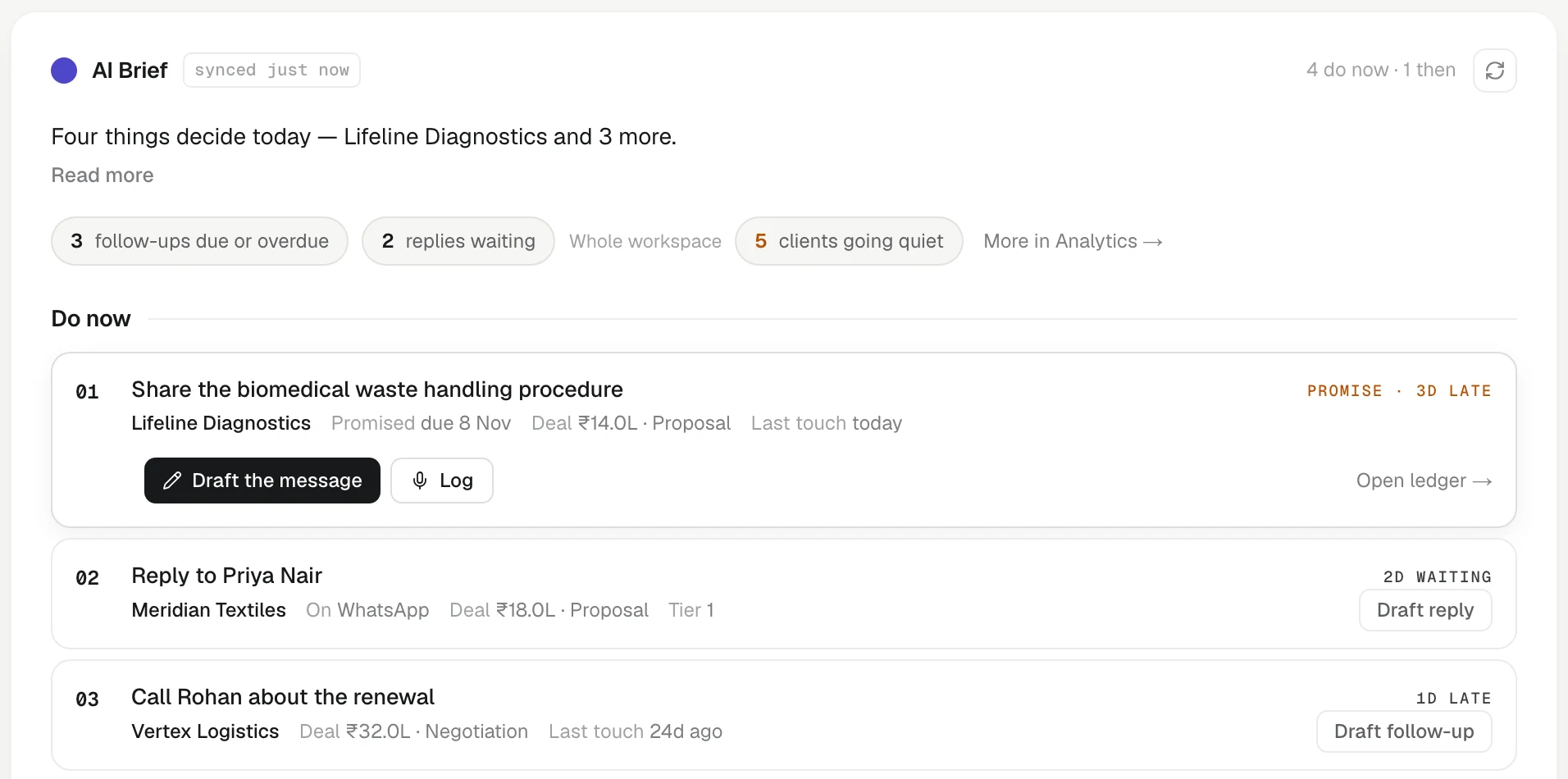
What is on the page
Today. At the top, the date, a greeting and your progress for the day — for example TODAY · 3 of 8 done.
Today's meetings. If you connected Google, your remaining meetings for the day sit inside the list, between Do now and Later today, with the client's people matched; a client meeting within two hours is marked Next, and Brief → opens a one-page brief for it. Client messages waiting for your reply are rows in the list; tap the replies chip to see them all.
AI Brief. One sentence that tells you what matters most today and why. It is written from the list below it, so the brief and the list never disagree. A row of signal chips shows the shape of the day at a glance.
Do now, then Then. One list, ranked by value × urgency. It mixes:
- clients who wrote to you and are waiting for a reply,
- promises you made that are now overdue,
- follow-ups that are due,
- important clients who are going quiet,
- suggested changes to a client's record from a recent touch.
Each client appears once, in the row that matters most. The top rows are Do now; the rest sit under Later today.
Working a row
Open a row to see its context — the deal, the last touch, the promise. Then use the buttons on it:
- Draft — writes a draft right inside the row (Draft reply, Draft follow-up or Draft check-in, depending on the row), with a line saying what it was based on. Edit it and press Send, or Not now. Nothing is sent until you send it.
- Log — opens the Log sheet already pointed at this client.
- Snooze — move it to Tomorrow or Next week.
- Done — for a follow-up with a client, KretaOS asks what happened, so the outcome lands on the client's page. Write a line and press Log it & mark done, or press Done — nothing to note if there is nothing worth keeping.
If a row fails to save, it comes back on your list with a note saying why.
Old follow-ups
If several follow-ups have been overdue for more than two weeks, Home shows one card about them instead of letting them crowd the list. Decide once: move them all out two weeks, close them as not done (they stay in the record and can be reopened from Agenda), or go through them one by one.
Mine and Everyone
In a team, Home shows your own work by default: clients you own, tasks assigned to you or to nobody, and promises on your clients. An admin can switch to Everyone to see the whole workspace. A manager can switch to My team to see the people who report to them as well.
Try it
- Open Home and read the AI Brief.
- Open the first row under Do now and look at its context.
- Act on it: press Draft, Log, Snooze or Done.
- Watch the progress line at the top move.
Or write to contact@tamkis.com