Deal risk
What the Low, Watch, At-risk and New chips on a deal mean, what KretaOS looks at, and when the chip is updated.
Updated 4 Nov 2026
Every open deal carries a small risk chip on the Deals board and on the client's Deals tab. It answers one question: is this deal likely to stall or slip away?
The four chips
- Low: moving at a healthy pace.
- Watch: worth a look. It has been in its stage a while, or there is a recent objection or an overdue follow-up on the deal.
- At-risk: stuck. It has sat in its stage well past the healthy time, or the relationship with the client is cooling.
- New: too early to judge — the deal was just added and has no history yet.
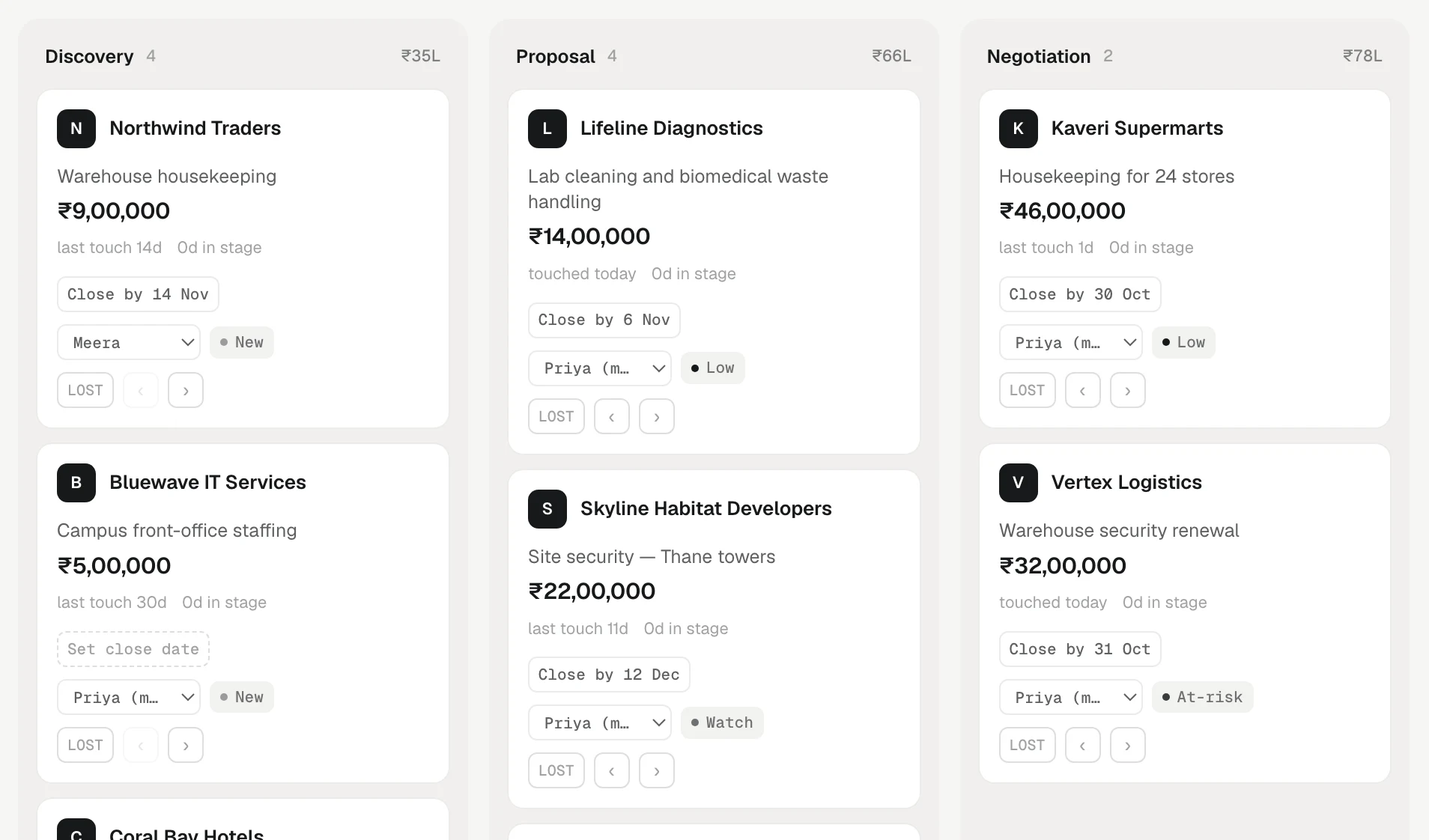
Tap the chip (or point at it on a computer) to see why it reads that way.
Won, delivered and lost deals are closed, are not scored and show no chip.
What KretaOS looks at
The first read is a fixed rule anyone can check:
- Time in stage, against a healthy time for that stage: about three weeks in Discovery, two weeks in Proposal and ten days in Negotiation.
- The relationship: a client whose relationship score has dropped below 40 puts their deals at risk, whatever the stage.
- Overdue follow-ups on this deal: the ones linked to the deal, and the deal owner's own follow-ups with the client. A teammate's follow-up on the same client does not count against your deal.
- Recent objections in the client's memory, such as price or lead time: the ones raised since the deal was added or in the last 90 days.
KretaOS then reads the deal with the client's memory and recent touches and may adjust the band when the full picture says so. For example, a long time in Negotiation with a reply from the buyer yesterday and a strong relationship reads softer than the same time with silence. If AI is unavailable, the rule's answer stands, so every deal always has a chip.
When the chip changes
A deal is scored when it is added, when it moves to another stage, and again every week while it stays open. KretaOS does not send the same deal to the AI twice when nothing about it has changed — a quiet deal keeps its last reading.
Acting on risk
- Open Ask AI and tap Flag at-risk deals, or ask "which deals are at risk, and why?" It lists them with the reason.
- Open the client from the card and check the Relationship summary and Open promises. A deal is usually at risk because a promise slipped or a conversation went quiet.
- Log the next touch, or set a reminder in Agenda.
Related
- The deals board — Add deals, move them stage by stage, mark them lost, filter by owner, switch to a table, and read what each card tells you.
- The relationship score — A 0 to 100 health number for every client, worked out from six plain parts with no AI, and what moves it.
- Pipelines and stages — The two ladders KretaOS runs (where a lead is, and where the money is), and how an admin names stages and adds pipelines.
- Deal risk and the next step — What the Low, Watch and At-risk chips mean, what moves a deal between them, and where to find the next thing to do.
Or write to contact@tamkis.com