Custom fields
Add the details your team tracks that KretaOS does not have yet, such as a GSTIN, a city or a renewal date, on clients, people and deals.
Updated 4 Nov 2026
Every business tracks a few things of its own: a GSTIN, a city, a contract end date, a customer type, a PO number. Custom fields add them to your records, so they sit on every client page, can be filtered and sorted, and are known to Ask AI.
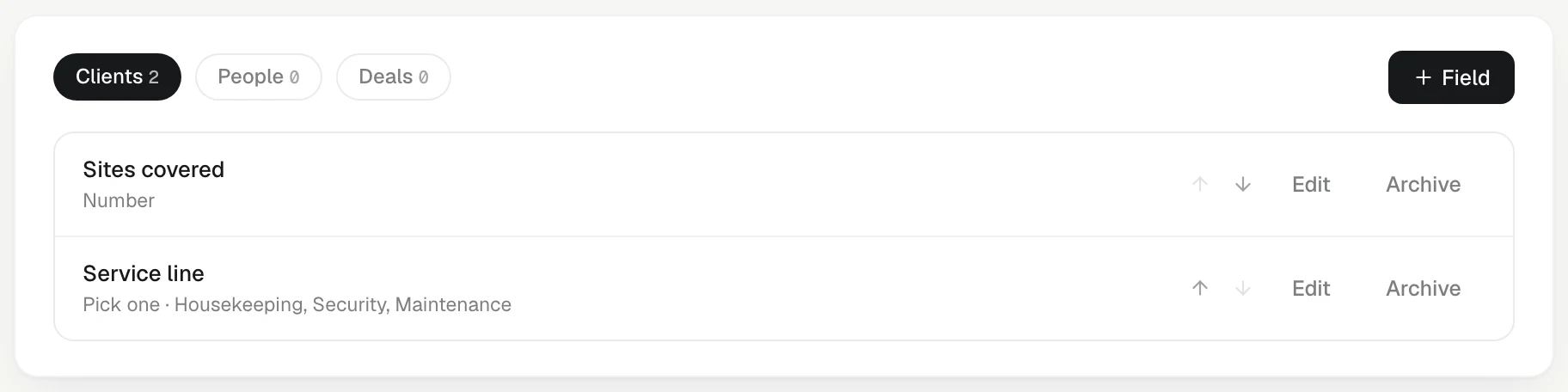
Add a field
- Open Settings › Fields.
- Choose where the field goes: Clients, People or Deals.
- Press + Field.
- Give it a Name, such as GSTIN or Contract end date.
- Pick its Kind: Text, Number, Money, Date, Pick one, Pick many, Yes / no, Link or Teammate. The kind is fixed once saved.
- For Pick one and Pick many, list the Choices, one per line.
- Press Add field.
Each of clients, people and deals can have up to 40 fields.
Fill in a value
- On a client: the Fields card on the client's Memory tab. Press a field (it reads Add when empty), type, and save. A tick confirms it.
- On a person: the Fields section on their page.
- On a deal: under each deal on the client's Deals tab, press Fields · 2 of 5 set (the numbers vary) to open its fields.
KretaOS understands the way people type: 1.5L, 2 cr or 1,20,000 for numbers and money, 31/03/2027 for dates. If it cannot read what you typed, it says so in words and saves nothing, rather than guessing. Every change is recorded with the old and new value.
Use them everywhere
- Filter and sort the Clients list by any field, and add it as a column. See Saved views.
- Ask AI reads them: "which clients have a contract ending this quarter?"
- Exports include a column for each field.
- Imports can fill them: the column mapper offers your fields.
Change or retire a field
In Settings › Fields, press Edit to rename a field or change its choices. Removing a choice keeps it on records that already have it.
To fix a choice's spelling on a Pick one field — say "Mumabi" to "Mumbai" — edit that one choice and Save. If records still hold the old word, KretaOS offers Move N records from "Mumabi" to "Mumbai". Each moved record is noted in the audit log. Choose Leave them to keep the old word on those records.
Press Archive to retire a field. It asks Archive? Values stay on records. Confirm with Archive. The field disappears from records and lists, and the values already filled are kept. Fields are never deleted. To bring one back, open the archived fields under the list and press Restore beside it.
Good to know
- Renaming a field never touches the values in it.
- An admin can let AI keep a client field up to date from each new touch. See Fields kept by AI.
- When two records are merged, the kept record's empty fields are filled from the other one.
Related
- Saved views — Filter, sort and add columns to your Clients list, then save it as a named view for yourself or the whole team.
- Tags — Label clients with short tags such as cotton or export, and use them to filter your list and saved views.
- Column mapping — How KretaOS decides which spreadsheet column is the company, the contact, the tier and the notes — and how to correct it before you import.
- Workspace settings — A tour of Settings — You (profile, alerts) and Workspace (name, timezone, AI autonomy, data and consent), and where the rest lives.
Or write to contact@tamkis.com