Column mapping
How KretaOS decides which spreadsheet column is the company, the contact, the tier and the notes — and how to correct it before you import.
Updated 11 Nov 2026
Every spreadsheet names its columns differently — "Firm", "Company Name", "Account", "Party". When you upload a file, KretaOS reads the headers and a few sample rows and suggests which KretaOS field each column feeds. You check the suggestion and fix anything it got wrong.
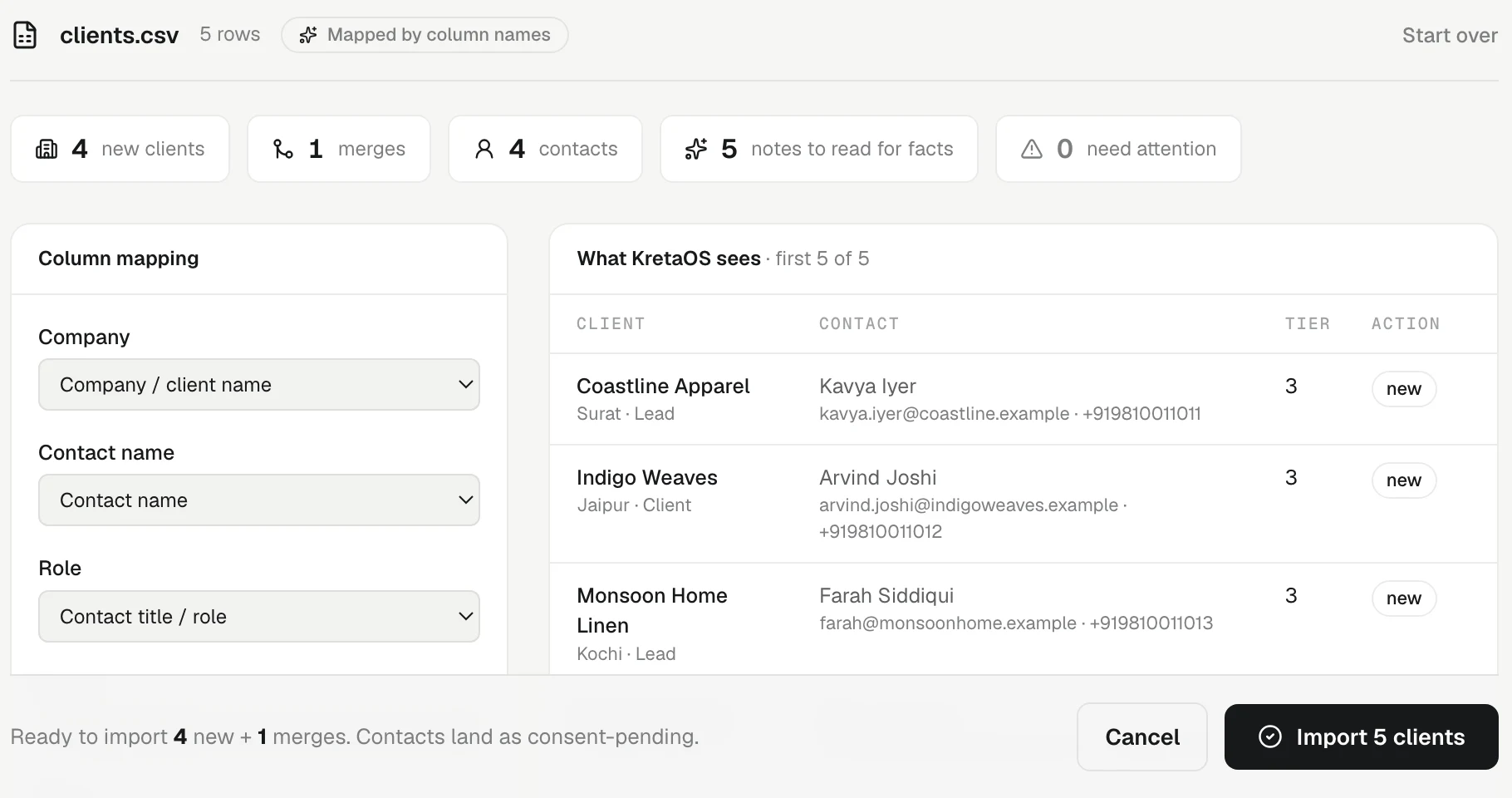
Reading the mapping
On the review screen, Column mapping lists every column in your file with a dropdown beside it.
- The header shows AI-mapped when the AI made the suggestions. If the AI is not available, KretaOS falls back to matching common header words and shows Mapped by column names.
- A column marked guess is one KretaOS was not sure about. Check those first.
- Change a dropdown and the preview, What KretaOS sees, updates straight away.
Fields you can map to
- Company / client name — the one field every import needs.
- Industry, Region, Website
- Tier / priority — a column such as "Priority", "Segment" or "Grade" is read as Tier 1, 2 or 3.
- Status — a column such as "Stage" or "Lifecycle". A row marked as a prospect lands as a lead.
- Type — client / lead / partner — a column such as "Type" or "Kind" saying what each row is. A row marked Client lands as a client, Partner as a partner, Lead as a lead. Without this column, the status decides.
- Lead source — how they found you: referral, expo, inbound and so on. Rows without one are marked as imported.
- Tags — several tags in one cell are split.
- Notes (→ facts) — free text that KretaOS reads for facts about the client. The notes are also kept on the client's About.
- Contact name, Contact email, WhatsApp / phone, Contact title / role
- — Ignore — — leave the column out.
If your workspace has custom fields, they appear under Your fields at the bottom of the dropdown. A value that does not fit the field — text in a number field, say — is left blank, and the row says so. KretaOS never guesses a value. See Custom fields.
Sheets of people, not companies
Some lists are one person per row with no company. KretaOS notices this. A row with a person's name and no company still lands — as a client record named after the person, marked "(individual)".
Tips
- Map Notes whenever you have one. A line like "prefers WhatsApp, renewal every March" becomes memory that Ask AI and the client page use from day one.
- Map phone numbers to WhatsApp / phone. A 10-digit Indian mobile number is saved with +91 in front.
- If something looks wrong in the preview, click Start over and fix the file. Nothing is saved until you click Import.
When the sheet does not say what the rows are
If no column is mapped to a type or status, the mapping card asks what the rows are: leads, clients, partners or contacts. A row that carries its own type still keeps it. The review counts clients, not rows, so three people at one company read as one new client and three contacts.
Related
- Import clients from CSV or Excel — Bring your existing client list into KretaOS from a spreadsheet. KretaOS maps the columns, you review, and every import can be undone.
- Custom fields — Add the details your team tracks that KretaOS does not have yet, such as a GSTIN, a city or a renewal date, on clients, people and deals.
- Undo an import — Take back a whole import in one click — as long as nobody has started working on those records yet.
Or write to contact@tamkis.com