Add a transcript as text
Already have a transcript from a video call or your notes app? Paste or upload it, and KretaOS writes the notes onto the client's page.
Updated 8 Oct 2026
Not every meeting needs recording. If the call already produced a transcript, for example from a video call tool, add it to KretaOS as text. You get the same notes, facts and promises as a recording, on the client's page.
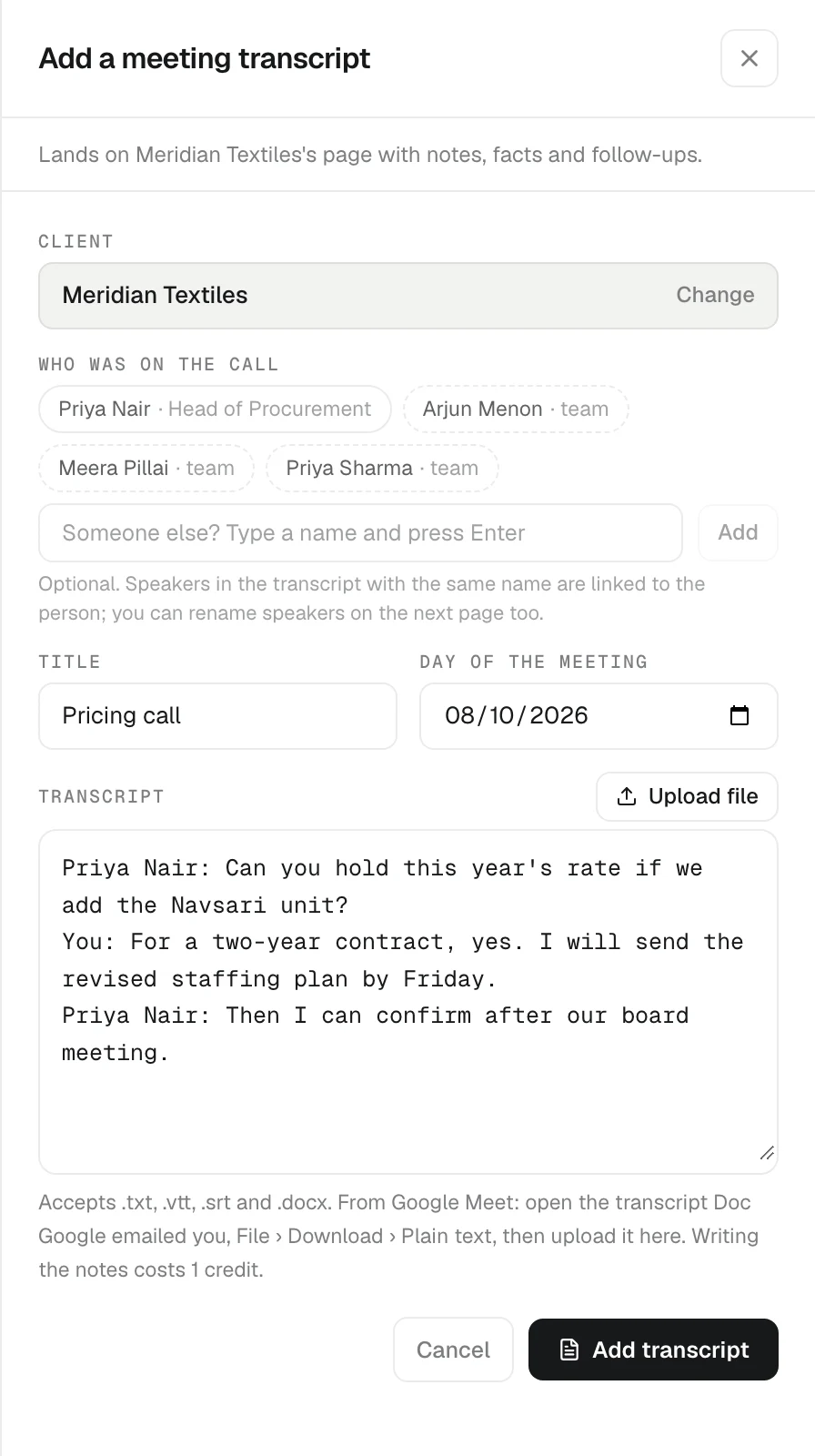
Add one
- Open it from either place:
- on a client's page, choose the Meeting tab in Log activity and press Have a transcript? Add it
- on Recordings, press Add a transcript
- Under Client, type a client's name and pick them (when you start from a client's page, it is already set).
- Optional: tick Who was on the call, from the client's people and your team, or type someone else's name and press Add.
- Optional: add a Title and the Day of the meeting.
- Paste the transcript into the box, or press Upload file, or drag a file onto the box.
- Press Add transcript.
KretaOS opens the new meeting page and writes the notes. They land on the client's page as soon as they are ready.
Files it accepts
.txt, .vtt, .srt and .docx. After you pick a file, a chip shows its name and word count.
Keep the speakers
Lines written as Name: what they said keep their speaker:
Ravi Menon: We need the order by Friday.
You: Friday works.
A speaker is linked to a teammate or a ticked attendee only when the FULL name matches one person — a first name alone, or a name two people share, stays unnamed until you tap it on the meeting page. You can rename any speaker on the meeting page afterwards. Plain text without names works too.
From Google Meet
Open the transcript Doc that Google emailed you, choose File › Download › Plain text, and upload it here. See Google Meet transcripts.
Good to know
- There is no audio. The meeting page says "Transcript added by hand — there is no audio."
- Writing the notes costs one AI credit, once per transcript.
- It follows the recording privacy your workspace is set to. By default only the person who added it can open the transcript; what KretaOS learns from it (facts and promises) is shared with the team on the client's page.
Related
- Google Meet transcripts — Turn the transcript of a Google Meet call into notes on the client's page by uploading it.
- Transcript and speakers — Read the notes and transcript of a recorded meeting, name who is speaking, and fix a line that went to the wrong person.
- Attach a meeting to a client — Choose the client once and the meeting lands on their page as a single entry, with its notes, facts, promises and follow-ups.
Or write to contact@tamkis.com