Saved and shared reports
Save a report as a link that always shows today's numbers, pin it to Analytics, share it with the team, and arrange reports on dashboards.
Updated 8 Oct 2026
A saved report is a question, not a snapshot. KretaOS stores what you asked — the measure, grouping, filters and period — and answers it again with fresh numbers every time you open it.
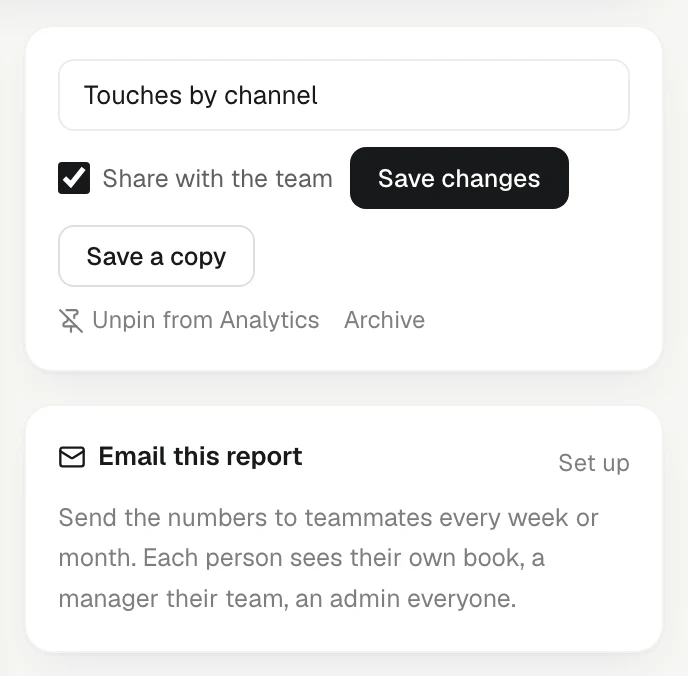
Save a report
- Build the report. See Build a report.
- Give it a name in the name box.
- Tick Share with the team if everyone should be able to open it.
- Click Save report.
It is pinned to Your reports on your Analytics page straight away.
Change, pin or archive your report
Open the report from Your reports:
- Change any setting and click Save changes.
- Pin to Analytics or Unpin from Analytics decides whether it shows in Your reports.
- Archive takes it off your Analytics page. KretaOS asks Archive this report? first.
Reports a teammate shared
Only the person who saved a report can change it. When you open a teammate's shared report you see Shared by their name — save a copy to change it.
Click Save a copy to make your own version. You can then change it freely; theirs stays as it was.
Whose numbers a shared report shows is chosen by the person looking, within what their role allows. If Asha shares "Won revenue by lead source", Ravi can read it for his own book or for the team total — only an admin can open it for one particular teammate.
Dashboards
A dashboard puts several saved reports on one screen.
- On Analytics, open Dashboards and click New dashboard.
- Name it, and pick reports from Add a saved report….
- Set each tile's width and height, and move tiles up or down.
- Click Save dashboard.
Every tile is answered live, in the viewer's own view of the numbers. Like reports, a dashboard can be shared with the team, and others can Save a copy.
Good to know
- The Starter plan holds one dashboard. Pro and Business have no limit.
- A saved report can also be emailed on a schedule. See Scheduled reports.
- A Viewer can open shared reports and dashboards, and can save, pin and archive reports of their own — a saved report is a question, not a change to the book.
Related
- Build a report — Pick a measure, cut it by owner, stage, channel or your own fields, filter it, and open the exact records behind every number.
- Scheduled reports — Email a saved report or dashboard to teammates every Monday or on the 1st — each person gets the numbers they may see.
- The Analytics page — Your revenue, activity, relationship health and promises in one place — every figure explained and linked to the records behind it.
Or write to contact@tamkis.com