Duplicates and merge
How KretaOS spots a record entered twice, why it never merges on its own, and what happens when an admin merges two records.
Updated 9 Oct 2026
The same client or person sometimes gets entered twice: once from an import, once by a teammate in a hurry. KretaOS spots likely duplicates and suggests them. It never merges anything by itself, because merging two different people is far worse than leaving a duplicate for a day.
How a duplicate is spotted
KretaOS compares records on, from strongest to weakest:
- the same email address,
- the same LinkedIn profile,
- the same phone number (ignoring +91 or a leading 0),
- a similar name.
A similar name on its own needs real evidence. A shared common surname such as Kumar, Singh or Shah is never enough, and when two records with matching names have different email addresses, the match is weakened. Everyday business words never count either: two names that share only words like Shree, Sai, New, Global, Enterprises, Traders, Solutions or Pvt Ltd — "Shree Krishna Enterprises" and "Shree Ram Enterprises" — are not suggested as duplicates.
A company is never matched to a person through its first contact's email or phone. When the same person appears at two companies, the suggestion reads "also appears at …" and offers Link as same person instead of a merge.
Where you see suggestions
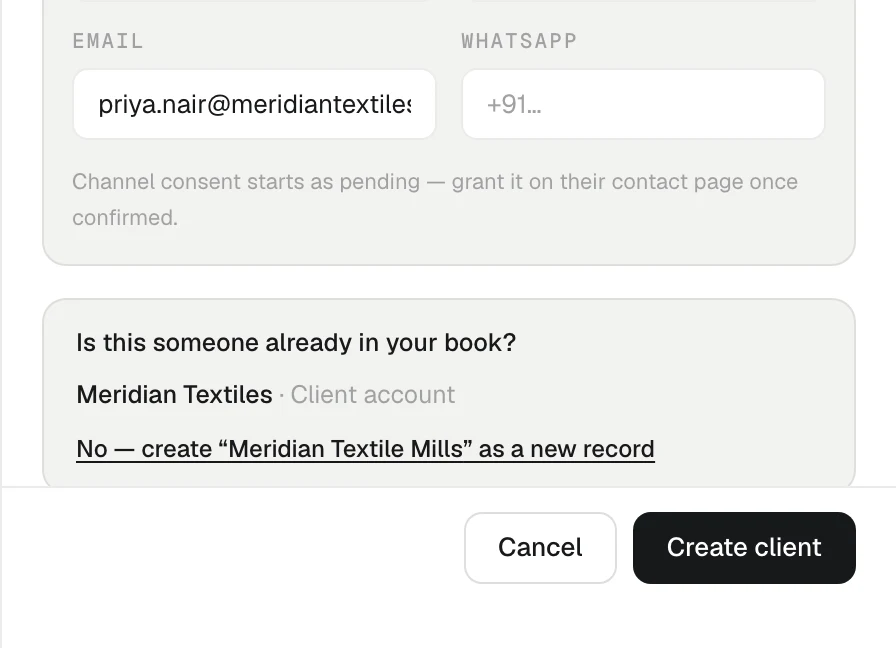
- When you add a record. The form asks Is this someone already in your book? with links to the likely matches. Open one, or carry on with No — create … as a new record.
- On the record's page. A quiet line reads Possible duplicate: with the other record's name and the reason, such as same email or similar name. It offers Review, Not the same, and × to hide it for now.
Merging two records
Press Review to open Review possible duplicate. For two companies you see them side by side with their details and activity, so you can pick the better one to keep.
- Press Keep “…” on the record you want to keep.
- Read Consent and contact details, if it appears: it says, in plain sentences, what happens to the person's email and WhatsApp consent and which address or phone number is added to the record you keep.
- Press Confirm merge? to go ahead.
What happens:
- Nothing is deleted. Every conversation, fact, task, deal and score history moves to the record you keep.
- The other record becomes a redirect. Old links, alerts and bookmarks to it still work; they open the record you kept.
- Details are combined. Empty fields are filled from the other record, tags are joined, and the stronger relationship wins (client over partner over lead).
- Last contact stays the latest of the two.
- Consent is never lowered by a merge. A "no" recorded on either record wins. A recorded yes on the record you keep is never replaced by the duplicate's "awaiting their OK". If the duplicate holds an older "no" and the record you keep a later answer, KretaOS does not merge and asks you to check with the person first, record what they say on the record you keep, then merge.
- Only valid addresses are copied. An email or phone number that would not pass the Edit panel's check is left behind, and Review says so.
- Each merge is recorded in the audit trail.
For people, the same steps keep one person and fold the other in. For a person who is also their own record, Review offers Link as same person or Merge into one record; see Same person, two companies.
When they are not the same
An admin presses Not the same on the page, or These are two different people — never suggest this pair again in Review. That decision is permanent and applies to the whole workspace, so the pair never comes back. Members and viewers see the suggestion but not that control.
Good to know
- Two companies, one person is a link, not a merge. Contacts at different companies are never merged.
- An import that took part in a merge cannot be undone, so check suggestions after importing.
Related
- Same person, two companies — Link one person across the companies they work with instead of merging, so their history and trust travel with them.
- People — Add the people you deal with at each client, keep their numbers and consent, and use their page as a person-level history.
- Undo an import — Take back a whole import in one click — as long as nobody has started working on those records yet.
- Roles — What an Admin, a Manager, a Member and a Viewer can each see and do in KretaOS.
Or write to contact@tamkis.com