Graph Memory
See your whole book as a map of clients, people and facts, with lines for who referred whom, in four layouts.
Updated 29 Oct 2026
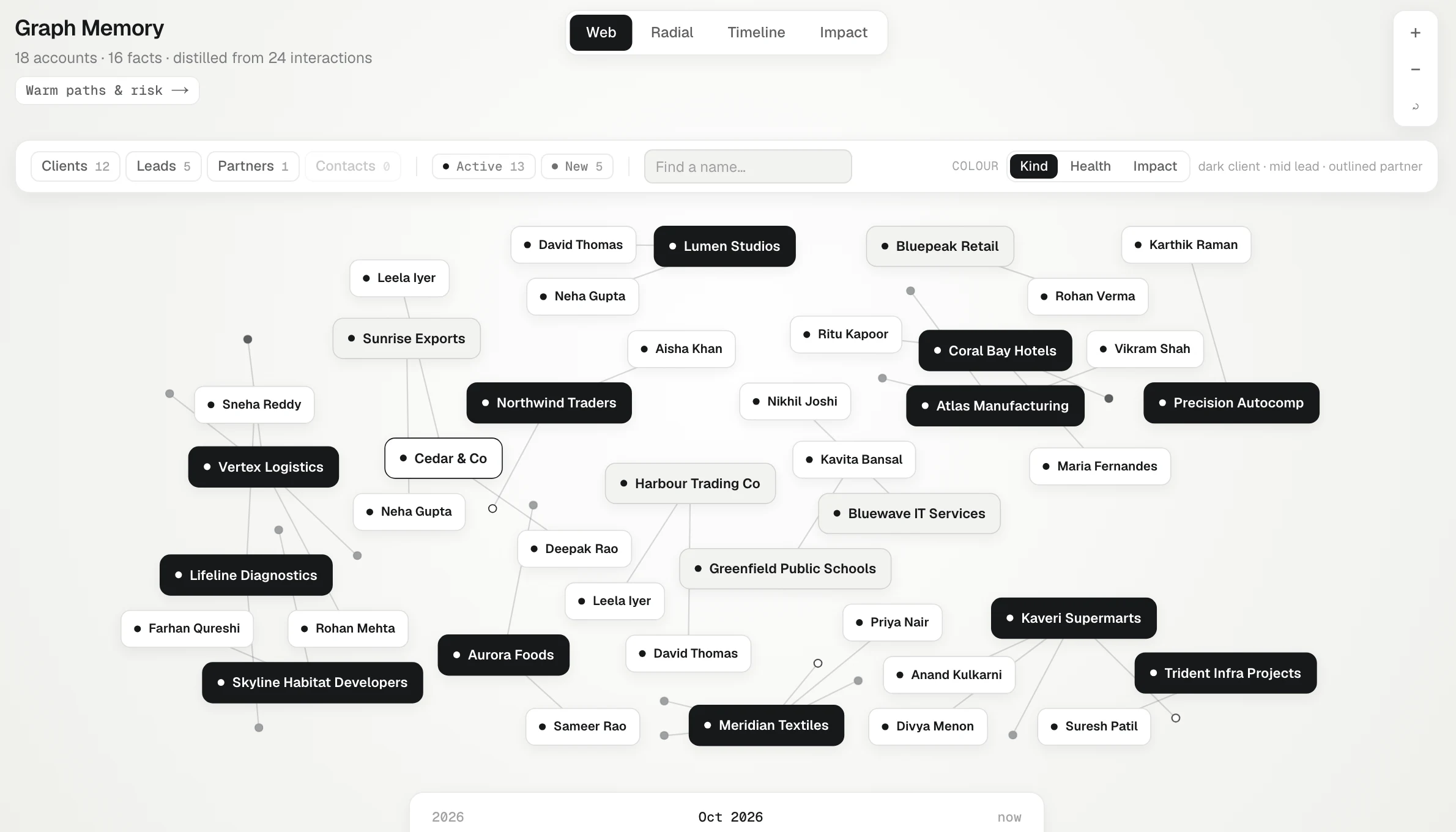
Graph Memory draws your book as a map. Each client, lead and partner is a pill — bigger for the ones with more deal value — the people at them sit beside them as plain names, and the facts KretaOS has learned hang off them as small dots. It is the quickest way to see the shape of your relationships: who is well known, who is thin, and who brought in whom.
Reading the map
The header counts what is drawn, for example "48 accounts · 212 facts · distilled from 1,340 interactions".
- Pills are your records; names without a pill are people. Two people with the same name show their company too, for example "Neha Gupta · Atlas". Click one to open a card with its people, its facts in full sentences, industry, region, last touch and score. Press Open → on the card to go to the record. Click a person to see their role at each company (marked "left" if they've moved on), whether they're a decision maker, their email and phone, when you last spoke and how often, and what you know about them — Message writes to them from the Inbox.
- Dots are facts. Point at one (or tap it) to read it.
- Lines join a company to its people and facts.
- Dashed lines are referrals: who brought this record to you. Set them with Referred by on a client (see Referrals).
Four layouts
Switch with the buttons at the top:
- Web: everything packed by how it connects. Good for spotting clusters.
- Radial: rings by closeness, with clients in the middle, then partners, leads and loose contacts.
- Timeline: lanes ordered by date, with month markers, to see how the book grew.
- Impact: referrers in the middle, sized by what they brought in; the records they referred fan out around them, with lines thickened by deal value.
Colour
Colour changes what the shade of a pill means, in any layout. A legend under the filters shows each shade:
- Kind: client, lead, partner or contact.
- Health: the relationship score, from strong to cooling. Pills are sized by score.
- Value: deal money (open and won) — the top third darkest, then clients with deals, then the rest.
Outside Health, a pill's size follows its deal value, so the clients that matter most are the easiest to find.
Narrowing it down
On a large book, open Filters to show only some kinds (Clients, Leads, Partners, Contacts) or statuses, or type a name in the search box to find a record or person — the search looks across the whole book, and Enter centres the best match with its connections lit up. The map redraws with just what you chose.
With more than 60 accounts, the map opens on a smaller part of the book: your team's clients if people report to you, otherwise your own, otherwise tier 1–2. The title line says so — "Showing 40 of 312" — and Show all draws everything. The select in the filter bar (Everyone's, Mine, My team, Tier 1–2) switches between them.
In the Timeline view, a slider at the bottom steps back through time. Drag it left and facts learned after that month fade out, so you see what the memory held back then. Drag it to now to see everything.
Use + and − to zoom (or your mouse wheel), the reset button to fit everything again, and drag to move around. Double-click an empty spot to zoom in on it.
From here
Related
- Network — Warm paths into leads, people who connect your accounts, who moved on, and accounts that rest on one person.
- Referrals — Record who brought each client to you, and see which partners and people bring in the most business.
- Facts and where they come from — What a fact is, the six kinds KretaOS keeps, how verified and inferred differ, and how to trace a fact to its touch.
- Graph Memory — See your whole book at once — clients, the people at them, the facts you hold and who referred whom.
Or write to contact@tamkis.com