Targets
Set a monthly or quarterly target for the team or one person, and watch actual against target, with a pace marker, on Analytics.
Updated 8 Oct 2026
A target turns a number into a goal: "20 lakh won this quarter" becomes something you can track, with a marker for where you should be by today.
Who can set targets
- Admins set targets for the whole team or for any one person.
- Managers set targets for themselves and the people who report to them.
- Members see their own targets. They cannot set them.
Targets come with the Pro and Business plans.
Set a target
- Go to Settings › Targets.
- Under Set a target, choose a Measure, such as Won revenue, Deals won, New deals, Pipeline created, Touches, Clients touched, Promises kept, Tasks done or Records added.
- Under For, choose the team or a person.
- Under Per, choose Month or Quarter, and pick when it Starts.
- Enter the Target and click Set target.
Money targets are in your workspace's currency.
Where you see progress
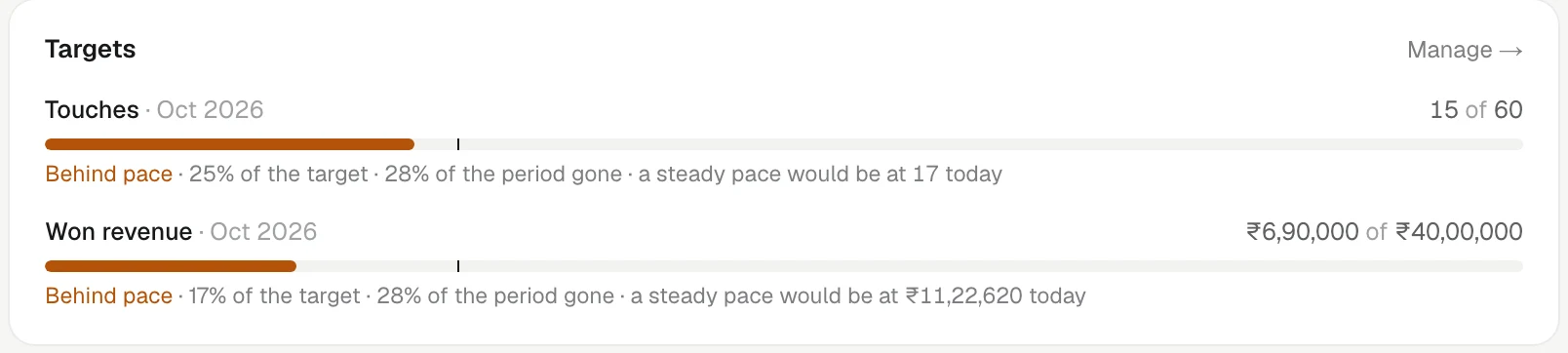
On the Analytics Overview, the Targets card shows each target in force for the view you picked: the actual figure, the target, and a pace marker — Ahead of pace or Behind pace — based on how much of the month or quarter has gone.
The monthly report mail also says how the month ended against its target. See The monthly report mail.
Change or remove a target
- Setting a new target for the same person, measure and period replaces it. KretaOS warns you first: "A target already exists for this — setting a new one replaces it."
- The old target stays on past reports, so last month is still judged against the target that was in force then.
- To remove one, click Remove beside it in the list and confirm.
Related
- The Analytics page — Your revenue, activity, relationship health and promises in one place — every figure explained and linked to the records behind it.
- The monthly report mail — Early each month KretaOS emails a summary of the month that ended, with a PDF for admins on Pro and Business.
- Managers and My team — Set who reports to whom so a manager sees their team's Home, numbers and monthly report.
Did this answer it?
Or write to contact@tamkis.com