Bring your clients in
Add one client in a sentence, or bring your whole book from a CSV or Excel file — an import can be undone straight after.
Lesson 2 of 8 4 minUpdated 29 Oct 2026
A book needs names in it
KretaOS files mail, meetings and logs against the clients and people it knows. So the sooner your clients are in, the sooner everything else starts landing in the right place. There are two ways in: one at a time, or all at once.
One client at a time
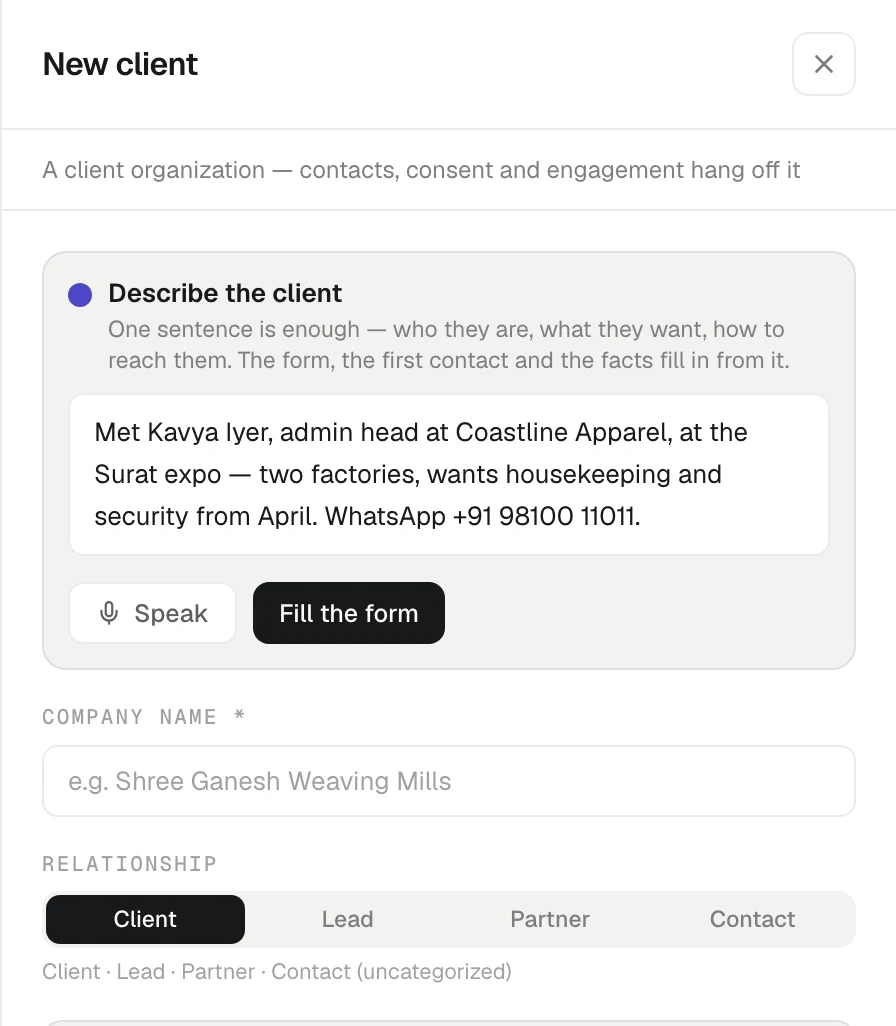
On the Clients page, press New client. The New client panel opens.
The quickest way is the Describe the client box at the top: write one sentence about them — who they are, what they want, how to reach them. For example: "Shree Ganesh Weaving Mills in Surat, Rajesh is the owner, wants a quote for 180 GSM fabric, rajesh@sgwm.example". Press Fill the form, and the form, the first contact and a few starting facts fill in from it. Check them, change anything that is wrong, and press Create client.
You can also fill the fields yourself: Company name, Relationship (Client, Lead, Partner or Contact), Industry, Region, Timezone, Website, Tier and the rest.
If the name looks like someone already in your book, KretaOS shows you the possible match before it creates anything, so you do not end up with two records for one company.
Your whole book at once
If your clients live in a spreadsheet, an admin can import them from Settings › Import.
- Drop a CSV or Excel file on Drop a CSV or Excel file, or click to browse.
- KretaOS reads the file and maps your columns to its own fields. The review screen, What KretaOS sees, shows each row as a client and a contact, and whether it is new or matches someone you already have.
- Fix any column in Column mapping if the guess is wrong.
- Press the button at the bottom — it reads Import and the number of clients — to commit.
Every import is a batch. If something went wrong, press Undo import, then Yes, undo, and the whole batch comes back out. Do it straight after the import: once your team has logged activity, changed consent or merged a record on those clients, KretaOS refuses the undo to protect that work. Past batches are listed under Import history.
What happens next
Once a client and its people are in, three things start working for them:
- Mail with their addresses syncs onto their page once you connect Google — the next lesson.
- You can log calls and meetings against them.
- Ask AI can answer questions about them.
Adding clients by hand, importing and undoing an import never use AI credits.
Try it
- Open Clients and press New client.
- Write one sentence about a real client in Describe the client and press Fill the form.
- Check the fields and press Create client — the new client's page opens.
- If you have a spreadsheet and you are an admin, try Settings › Import with it.
Or write to contact@tamkis.com