The deals board
Read the board at a glance, add a deal, move it from its ⋯ menu, mark it lost, narrow it to one person's deals, and switch to a table.
Lesson 2 of 5 5 minUpdated 4 Nov 2026
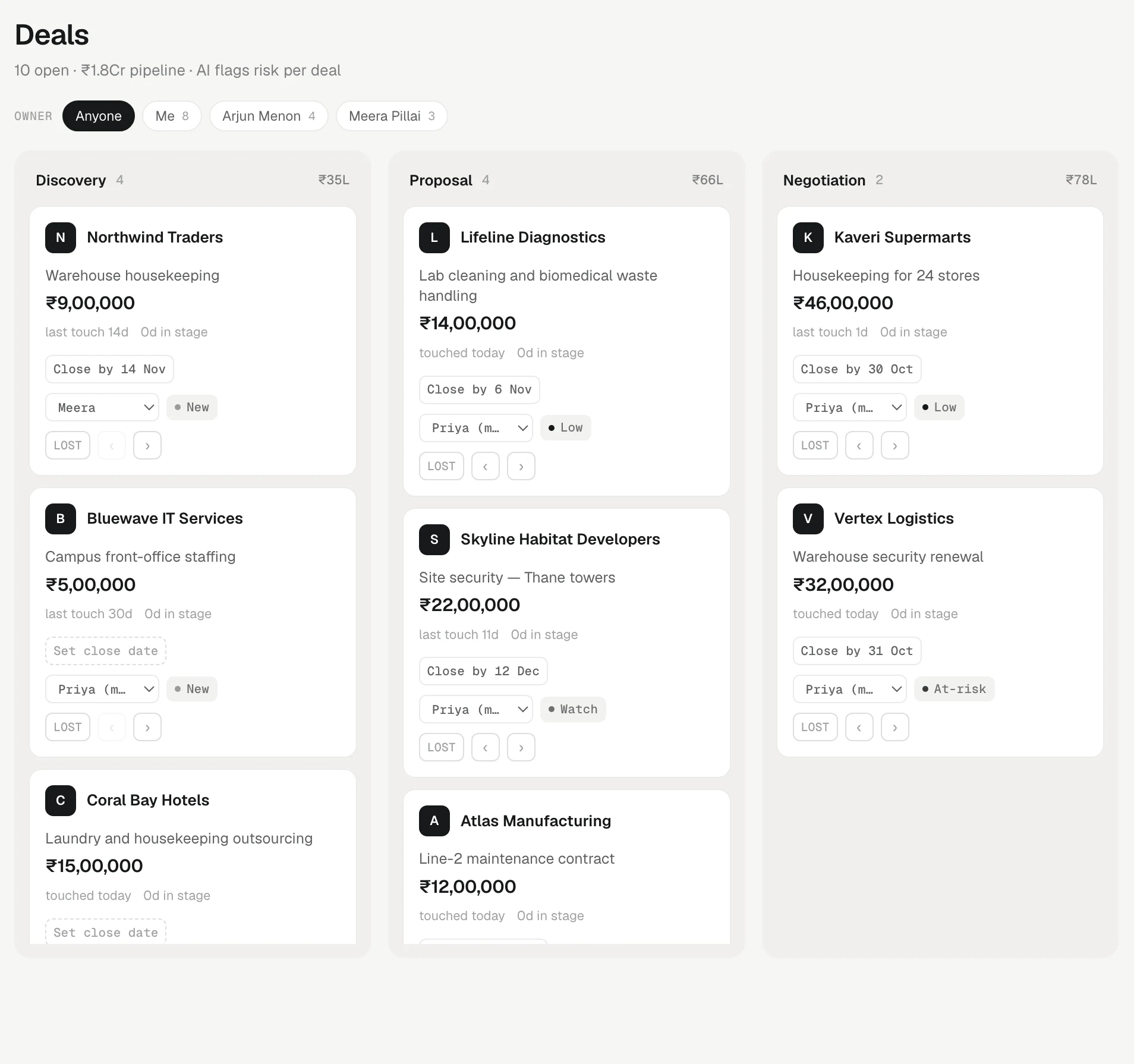
Deals in the side bar opens the board: one column per stage, one card per deal. It is the fastest way to see where every open opportunity stands.
Reading the board
The header shows how many deals are open and the total open value, for example "6 open" followed by the pipeline total. Only open stages count towards that total. Won, delivered and lost deals do not.
Each column shows its stage name, how many deals sit in it, and the total value in that stage. An empty stage shrinks to a slim strip so the space goes to the stages that have deals.
Each card shows:
- the client's name, the deal's title and its exact value
- last touch — how many days since anyone was in touch with that client, or "never contacted"
- how many days the deal has sat in this stage
- a risk chip: Low, Watch, At-risk or New (lesson four explains it)
- the owner's initials
Click the card to open the client's page. When a stage gets long, press Compact for one line per deal.
Adding a deal
Press + New deal. Pick the client under Company…, type a Deal title and a value (2.5L, 1.2Cr and 50k work as well as plain numbers), and press Add to Discovery (the button names your first stage). Every new deal starts in the first stage; you move it on from there.
You can also add a deal from a client's own page: + Add deal on its Deals tab lets you pick the pipeline and stage.
Moving a deal
Every card has a ⋯ button (More for this deal). Its menu names the stage each move goes to:
- Advance stage to … moves it one stage forward.
- Move back to … moves it one stage back.
With a mouse there is a shortcut: point at a card and › (Advance stage) and ‹ (Move back) appear.
The forward path runs through your open stages, then Won, then Delivered. Delivered is for work that has been fulfilled after the win, and it still counts as won revenue.
Lost is deliberately not on that path, so nobody loses a deal by clicking one arrow too many. It sits only in the ⋯ menu as Mark lost (named after your lost stage), a deliberate second click.
When a move changes the client too, the board says so — "Mehta Exports is now a client." The first lesson explains why.
One person's deals
On a team, an Owner picker sits above the board: Everyone, Me, My team if people report to you, and each teammate, with a count beside each. Pick one to see only their deals; the header totals follow. To hand a deal to a teammate, press its owner's initials (or ⋯ › Change owner). They get a bell.
The table
Press Table for one row per deal — client, stage, value, expected close, owner, risk and last touch. Press a heading to sort; values sort within each currency, never across. Board brings the columns back.
Old closed deals
Deals that closed more than a year ago leave the board so it stays readable. A line at the bottom says how many are hidden, with Show to bring them back. Nothing is deleted — they stay on the client's page and in every report.
Try it
- Open Deals and press + New deal.
- Pick a client, type a title such as "Annual service contract" and a value, then press the Add to … button.
- Press ⋯ on the new card and pick Advance stage to …, then Move back to … to bring it back.
- If you are on a team, open Owner and pick Me to see only your deals.
- Press Table, then the Value heading to sort by value.
Or write to contact@tamkis.com